The Astro timer is an invisible server component with the task of calculating the position of the sun at the set location. In addition, the moon phase is calculated and output. The Astro timer works with an internal calculation logic and does not require internet access.
For the sunrise and sunset can be defined circuits, which are output via corresponding outputs. The data types are freely adjustable. In case of output, the formatting should be taken into account.
The sunrise and sunset output in the format [hh: mm: ss] is of type DateTime and can be displayed in 12 or 24h format. For a 12h ad, use hh: mm: ss formatting and for a 24h display, use HH: mm: ss.
Data points of the component
Name |
Type |
function |
|---|---|---|
Moon phase |
Output |
Here, the moon phase is output as a numerical value between 0 and 30 as an integer. The value 0 corresponds to new moon and the value 15 full moon. Accordingly, phases 0-14 are increasing and those of 16-30 decreasing. |
Visible Moon Area [%] |
Output |
Here, the Visible Lunar Surface is output as a percentage value. |
Sunrise [hh:mm] |
Output |
Here the time of the sunrise is displayed in the display format [hh: mm]. |
Sunrise Output |
Output |
Here, at the time of the Sunrise, the selected value is output, according to the selected data point type. |
Sunrise Offset [hh:mm] |
Output |
Output of the offset time in the display format [hh:mm]. |
Sunrise Offset [min] |
Bidirectional |
Here, the selected offset for the offset output, in minutes, is output and can be changed externally. |
Sunrise Offset Output |
Output |
Here, at the offset time of the Sunrise, the selected value is output, according to the selected data point type. |
Sun azimuth northern hemisphere [°] |
Output |
This output gives the position of the sun, in degrees, for the chosen location in the northern hemisphere. |
Sun azimuth southern hemisphere [°] |
Output |
This output gives the position of the sun, in degrees, for the chosen location in the southern hemisphere. |
Sun Elevation [°] |
Output |
This output outputs the elevation angle of the sun, over the horizon, in degrees. |
Sun Hours [h] |
Output |
This output outputs the hours of sunshine (time between sunrise and sunset) in hours. |
Sunset [hh:mm] |
Output |
Here, the time of the sunset is displayed in the display format [hh: mm]. |
Sunset Output |
Output |
Here, at the time of sunset, the selected value is output, according to the selected data point type. |
Sunset Offset [hh:mm] |
Output |
Output of the offset time in the display format [hh:mm]. |
Sunset Offset [min] |
Bidirectional |
Here, the selected offset for the offset output, in minutes, is output and can be changed externally. |
Sunset Offset Output |
Output |
Here, at the offset time of the sunset, the selected value is output, according to the selected data point type. |
Properties
Name |
|
function |
|---|---|---|
Time Zone |
UTC +1 Berlin |
Here, the time zone is chosen for the location of the calculation. Thus, summer / winter time changes are taken into account in the calculation. |
Location [latitude;longitude] |
Eberbach |
The latitude and longitude are used to define the location for the calculation. This information is available via internet map services. |
Cyclic Sun Position Output [min] |
10 |
Here the time for the cyclic output of the sun position values, azimuth and elevation, in minutes is selected. The values are output on the respective outputs at this distance. |
Sunrise Output Value |
On |
This value is output at the time of the Sunrise on the data point of the same name. Any data types are possible. |
Sunrise Offset Output Value |
On |
This value is output at the time, +/- the offset time, of the Sunrise on the data point of the same name. Any data types are possible. |
Sunrise Offset [min] |
0 |
This time, (+ or -) in minutes, is added at the Sunrise time and then triggers the offset output. |
Sunset Output Value |
Off |
This value is output at the time of the sunset on the data point of the same name. Any data types are possible. |
Sunset Offset Output Value |
Off |
This value is output at the time, +/- the offset time, of the sunset on the data point of the same name. Any data types are possible. |
Sunset Offset [min] |
0 |
This time, (+ or -) in minutes, is added at the time of sunset and then triggers the offset output. |
Send state at startup |
|
With this property, the component sends the current status when the project is loaded. |
Azimuth and elevation of the sun
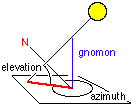
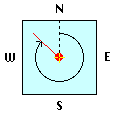
The position of the sun azimuth refers to the chosen location as the location of the EisBaer server.
The elevation angle indicates the height of the sun above the horizon (negative value: sun has set).
The azimuth angle indicates the direction of the compass with respect to the north of the sun. 0° = N, 90° = E, 180° = S, 270° = W |
|
|
sun
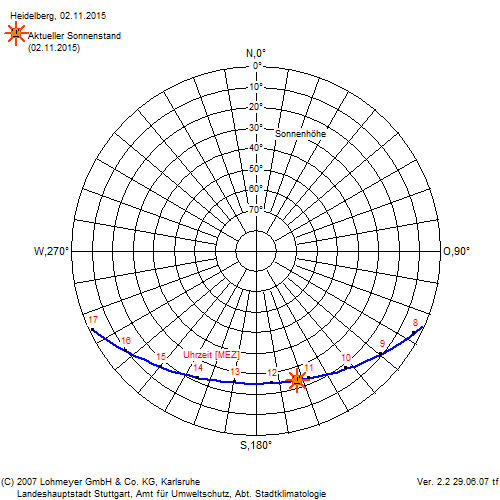
The position of the sun is the position of the sun in the sky. It depends on the place of observation, the time of day and the season. The position of the sun determines, among other things, the angle of incidence and the intensity of the sunlight.
In particular, one speaks of high or low sun position and its change over the seasons. The sun reaches its highest level at noon (to be precise: at 12 o'clock true local time) in the south (for an observer north of the northern tropic) or in the north (for an observer south of the southern tropic). This so-called "noon height" depends on the latitude and the date; It varies from 16.5 ° to the winter solstice and 63.5 ° to the summer solstice at a width of 50 °.
Sample templates:
Download link: Astro Timer with Calendar
General information about sample templates (SCADAComp):
Download the desired SCADAComp file and unzip the ZIP file into an empty folder. In the EisBär editor ribbon, select the "Import components" option under "Project" and load the template. If a conversion is necessary because the EisBär version is newer, confirm the process with YES. To retain functionality, select the "Create new networks" option as the copy rule when pasting.