For use in virtual environments without an available USB port, the EisBaer USB license dongle can be connected via a USB device server.
It must automatically connect the USB license dongle as a service before the user logs in - the SEH myUTN50a Device Server fulfills these requirements.
Installation Guide SEH UTN Manager for SEH myUTN50a Device Server
- start application
- Next, accept
- Installation for all users of this computer, Next,
- Complete, Next, Next, Next,
- Installation starts
- Complete
Configuration Instructions SEH UTN Manager for EisBar dongle on a SEH myUTN50a Device Server
- Start SEH UTN Manager, select UTN Server and add, OK
- Open the Port \ Settings menu
- Activate automatic reconnect
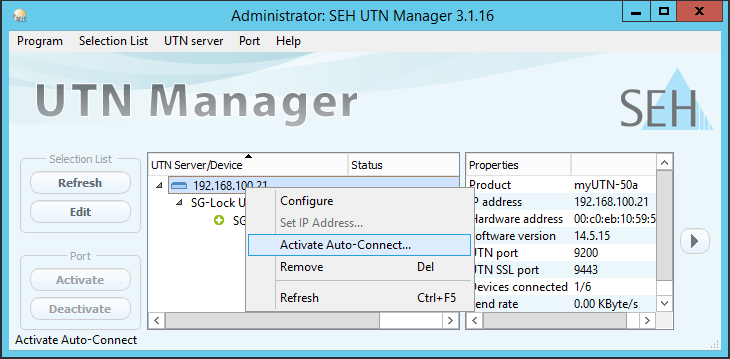
- Activate Port (SG-Lock)
- Program -> Options -> Automatic -> Auto Disconnect must not be active.
- The SEH UTN Manager can be closed. He is not necessary for the operation.
Notice:
Web UI myUTN under Security --> Device access --> USB devices HID class must be active.
Web UI ServerPro under Security --> USB --> USB devices HID class must be active
The dongle number is displayed in the server configuration console by clicking on the "Show dongle" button.
The dongle server is ready for use and the EisBaer dongle is connected to the EisBaer server service before the user logs on.
For newer versions:
- Activate port
- Right-click on the server -> Activate Activate Auto-Connection for the corresponding USB port.