This component is used to control and query information from charging stations. If this component is created, it counts as 150 components.
Depending on the model, the connection must be enabled (dip switch in the device 3->ON).
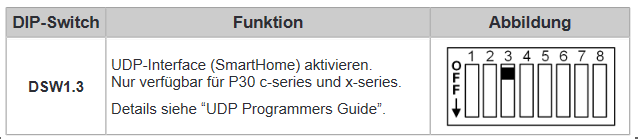
Translation:
Enable UDP interface (SmartHome). Only available for P30 c-series and x-series.
Currently these charging stations can be controlled with this driver:
•ABB EVLunic Pro S
•ABB EVLunic Pro M
•KEBA c-series
•KEBA x-series
Data points of the component
Name |
Type |
function |
|---|---|---|
Debug [Text] |
Output |
Error texts are output here. These may e.g. with the "Log window" component. Attention: Diagnosis or debug outputs are only intended for the case of an error. Please use only after consultation with the support team! These may significantly affect the performance of the service when used |
Debug Verbose |
Input |
To (de) enable advanced debug output. The diagnostic information is displayed there, linked to the [Signal] input of the log window. |
DLM |
Bidirectional |
Connection to the Dynamic load management Component. |
Update report history |
Input |
Manually triggers the saving of the report history to the export file. |
Update Reports |
Input |
Triggers an update of all reports. |
Driver On/Off |
Bidirectional |
(De) Activate the component |
Driver state |
Output |
Returns the on / off status of the driver. |
Commands |
Folder |
|
- Cancle Authorization |
Input |
Ends the authorization session. |
- Send Authorization - Trigger |
Input |
Starts the authorization request with the previously specified RFID TAG / RFID-CLASS data |
- Send Authorization [RFID Class] |
Input |
Specification of the RFID CLASS (10 byte HEX string) to start a authorization |
- Send Authorization [RFID TAG] |
Input |
Specification of the RFID TAGS (8-byte HEX string) to start an authorization |
- Limit Energy [Wh] |
Input |
Sets the energy limit for the current or next charge session. |
- Geräteanschluss entriegeln |
Input |
Unlocks the device connection (charging must be completed before) |
- Limit current (direct) [A] |
Input |
Limits the charging current. |
- Limit current (delayed) - Trigger |
Input |
Sends the delayed load current limit command |
- Limit current (delayed) - current [A] |
Input |
Specification of the maximum charging current, which becomes active after a delay to be defined |
- Limit current (delayed) - Delay [s] |
Input |
Specification of the delay in seconds |
Unlock Device Socket |
Input |
(De) Activates the charging station (permanent) |
X2 Relay Terminal open/close |
Input |
Opens / closes the X2 terminal relay |
History (0-30) |
Folder |
|
- Interruption-Reason |
Output |
0 = charging was not completed, 1 = plug was pulled, 10 = RFID card was de-authorized. |
- End (Seconds from System start) |
Output |
Displays the seconds from system start to end of session. |
- End (timestamp) |
Output |
Returns the end time. |
-Total energy at start [kWh] |
Output |
Returns the total energy value at the start time. |
- Maximum current (Hardware) [A] |
Output |
Returns the maximum device output current in amps. |
- RFID Class |
Output |
Shows the RFID class of this session. |
- RFID Tag |
Output |
Displays the RFID tag of this session. |
- Session ID |
Output |
System generated ID for the loading process |
- Start (Seconds from System start) |
Output |
Displays the seconds from the system start to the start of the session. |
- Start (timestamp) |
Output |
Returns the start time |
- Transfered energy in session [kWh] |
Output |
Transferred energy in the session |
States |
Folder |
|
- Outputs-Value |
Output |
Setting for X2 relay terminal: 0 = closed, 1 = open,> = 10 = pulse output (number stands for pulse / kWh) |
- Authorization required |
Output |
Indicates whether authorization is needed. |
-Authorization function activated |
Output |
Indicates whether the authorization function is enabled or not. |
- Backend present |
Output |
Indicates whether communication with the backend takes place (1) or not (0). |
- Energy to deliver [kWh] |
Output |
Output of the set energy to be transmitted in kWh. |
- Failsafe Timeout [s] |
Output |
Outputs the timeout for the emergency mode |
- Error 1 |
Output |
Internal error from the charging station (for the manufacturer support) |
- Error 2 |
Output |
Internal error from the charging station (for the manufacturer support) |
- Firmware |
Output |
Displays the current firmware version. |
- Device activated |
Output |
Indicates the activation state of the device |
- Communication module present |
Output |
Indicates if a communication module exists |
- Charging current [A] |
Output |
Returns the current charging current. |
- Charging current after delay [A] |
Output |
Outputs the charge current after the delay. |
- Delay [s] |
Output |
Returns the set delay in seconds. |
- Maximum device current [A] |
Output |
Returns the maximum device current in amps. |
- Maximum current - PWM Duty Cycle [%] |
Output |
Specifies the% value of the PWM at the maximum current. |
- Maximaler Strom [A] |
Output |
Returns the maximum output current in amps. |
- Maximum current during Failsafe mode [A] |
Output |
Outputs the maximum output current in AmpSafe mode in FailSave mode. |
- Product name |
Output |
Returns the product name. |
- Serial |
Output |
Returns the serial number of the charging station. |
- System enabled (charging can be activated) |
Output |
Indicates whether the system is activated or not. |
- Uptime [s] |
Output |
Returns the update time in seconds. |
- Time sync quality |
Output |
At "0" the device is not in sync time. At 1, the sync is good (with NTP, OCPP and Proxy) and at 2 moderate (with web interface and UDP). |
- State of the X1-Input |
Output |
See manufacturer's manual. |
Plug State |
Folder |
|
-- Cable plugged in station (not locked) |
Output |
Represents the decoded single state (1). |
-- Cable plugged in station (locked) |
Output |
Represents the decoded single state (3). |
-- Cable plugged in station and car (not locked) |
Output |
Represents the decoded single state (5). |
-- Cable plugged in station and car (locked) |
Output |
Represents the decoded single state (7). |
-- No cable plugged |
Output |
Represents the decoded single state (0). |
-- Plug state value |
Output |
Returns the status as a byte (0, 1, 3, 5, 7). |
Measurements |
Folder |
|
-- Power [W] |
Output |
Returns the current MessValue Off. |
-- Power factor |
Output |
Returns the current power factor. |
-- Voltage Phase 1 [V] |
Output |
Returns the current reading in volts. |
-- Voltage Phase 2 [V] |
Output |
Returns the current reading in volts. |
-- Voltage Phase 3 [V] |
Output |
Returns the current reading in volts. |
-- Current Phase 1 [A] |
Output |
Returns the current reading in Amps. |
-- Current Phase 2 [A] |
Output |
Returns the current reading in Amps. |
-- Current Phase 3 [A] |
Output |
Returns the current reading in Amps. |
-- Transmitted energy during this session [kWh] |
Output |
Returns the current reading in watt-hours. |
-- Transmitted energy (total)[kWh] |
Output |
Returns the current reading in watt-hours. |
State |
Folder |
|
-- Ready to charge |
Output |
Represents the decoded single state (2). |
-- Error |
Output |
Represents the decoded single state (4). |
-- Charging |
Output |
Represents the decoded single state (3). |
-- Charging interrupted |
Output |
Represents the decoded single state (5). |
-- Not ready to charge |
Output |
Represents the decoded single state (1). |
-- Startup |
Output |
Represents the decoded single state (0). |
-- State value |
Output |
The status value DP outputs the status as a byte (0-5). |
Properties
Name |
Standard |
function |
|---|---|---|
Local IP Address |
|
IP address of the local interface to be used (network card) |
Device IP Address |
|
IP address of the charging station to be queried |
Update Interval Report 1 [s] |
3600 |
Polling interval for Report 1 (static information) |
Update Interval Report 2 [s] |
10 |
Polling interval for Report 2 (status information) |
Update Interval Report 3 [s] |
5 |
Polling interval for Report 3 (readings during a load). It should be noted that this report is only executed in the specified interval if the status from Report 2 indicates an active loading process. |
Connection check Interval [s] |
30 |
Interval for the cyclic connection check. |
Reply Timeout [s] |
2 |
Timeout for the response of a query |
History Export File |
|
Specification for the storage path of the history data. |
Driver On/Off |
|
(DE) Activate the component |