The fault message manager display is a Visible Client component. It is used to display and operate the messages of the fault message manager.
To use the fault message manager display, this must be connected to a fault message manager. It is possible to connect several fault message manager displays with one fault message manager, but not vice versa several fault message managers with a fault message manager display.
The fault message manager display is a list box with tab switching.
- In the "New" tab, all new incoming messages are displayed until a user action processes the message.
- The "Active" tab displays all messages that have been moved from the "New" tab via a user intervention, but have not yet been canceled.
- All messages are collected in the "History" tab. Must be loaded separately!
Data points of the component
Name |
Type |
function |
|---|---|---|
Lock operation (display only |
Input |
The input option can be enabled or disabled externally. |
Mouseover |
Output |
This output can be used to start an event when the object is moved by mouseover. |
Visible |
Input |
If this input is not used, the component is Visible. When used, the unvisible component is switched with an off signal and a Visible on signal. |
Faultmanager |
Bidirectional |
Connection between a fault message manager and one or more fault message manager displays. |
Input |
message status
Messages can have four states:
- Fault triggered
- Fault triggered acknowledged or parked on time
- Error terminated
- Fault finished acknowledged
The statuses and the time stamp of the respective state changes are displayed in the Status and Date / Time column.
Client-View
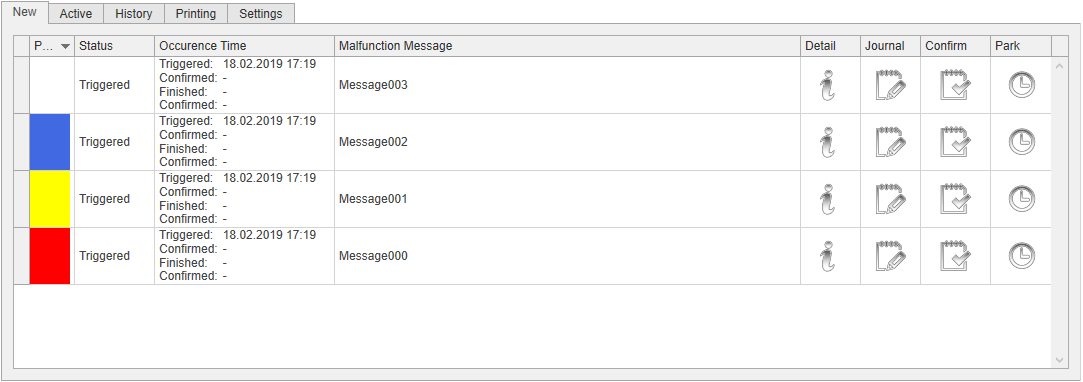
New
When a new message arrives, it will be displayed here. There is an automatic switch to this tab.
Control columns:
- Detail: by clicking on the I symbol, the additional information entered in the fault message manager is displayed.
- Logbook: This opens the dialogue for entering information. These are saved with date / time and user information.
- Confirm: Clicking on the message confirms and moves it to the active folder (message is still pending) or the archive (message finished).
- Parking: By clicking on the message parked in the Active TAB. The parking duration is adjustable. The message is suppressed for the set time.
active
In this tab, all messages are displayed that have been acknowledged or parked, but are still in the fault state.
History
This tab displays all completed messages, i. if they are no longer in the tab New or Active.
To view the history, press "Load" in the header of the history.
All fault messages in the course are written to a separate database for each fault message manager.
A good filter function is provided by the Print tab. There, all messages can be grouped, sorted and filtered.
Printing
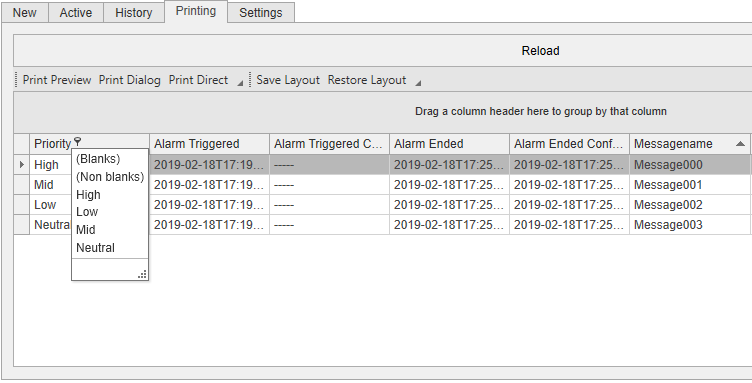
This tab displays the messages from the history database for printing. By grouping, sorting and filtering the messages can be printed.
The layout settings are saved for each EisBaer client. Thus it is possible to reload the previously saved layout settings after a client restart.
Settings
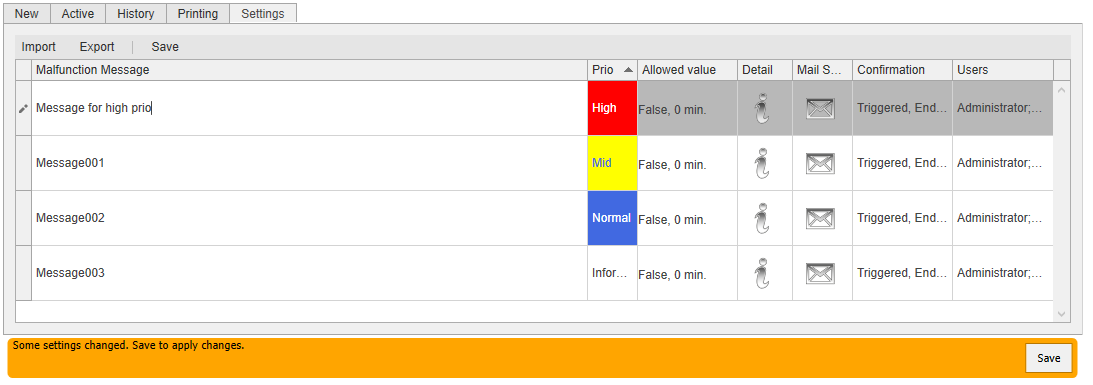
This tab displays all created channels for changing channel settings. Clicking on changes the error message text, priority, permitted values, error message details, e-mail settings and acknowledgment behavior. The user display authorization is changeable only in the EisBaer client, not in the simulation.
Every change must be accepted by saving.
ATTENTION: Changes must be saved as soon as possible. If any fault message arrives at the fault message manager, unsaved changes will be lost.
Export exports all channels in XML format.
Import imports channels from an XML file.
ATTENTION: The existing channels will be replaced with the imported ones. Channels that no longer exist are deleted and connected networks are lost. Newly added channels are not linked automatically and thus have no function.