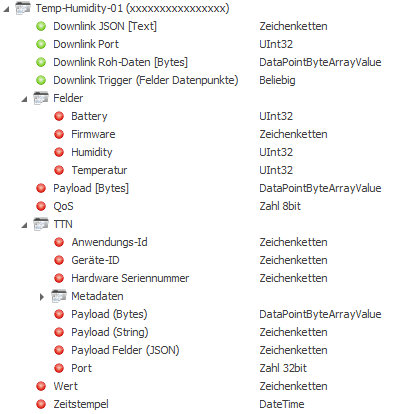
This special driver enables the connection to a TTN network (e.g. LoRaWAN - Long Range Wide Area Network) to receive data.
Global data points of the component
Name |
Type |
Function |
|---|---|---|
Diagnosis [Text] |
Output |
Error texts are output here. These canbe displayed e.g.with the component "Protocol window" .Attention: Diagnosis or debug outputs are only provided for the case of an error. Please use only after consultation with the support team! If used, these can considerably impair the performance of the service |
Extended diagnosis |
Input |
(De)Enables the extended debug output. Attention: Diagnosis or Debug - outputs are only provided for the case of error. Please use only after consultation with the support team! If used, these can significantly affect the performance of the service |
Dynamic |
Folder |
The dynamic data points are created in this folder. |
Driver On/Off |
Bidirectional |
(De)Activating the component |
Connection status |
Output |
Outputs the current connection status as on/off signal. |
Dynamic data points per device created
Name |
Type |
Function |
|---|---|---|
Json Data Downlink |
Input |
Downlink request of the data in the form of a JSON data packet. |
Port Set Downlink |
Input |
Request of the data packet via the transferred port. |
Raw data downlink |
Input |
Downlink request of the data in raw data format [bytes]. |
Field Trigger Downlink |
Input |
Downlink request for the field data points via this trigger input. |
Payload [bytes] |
Output |
Output of the transported raw data as a byte array of the last data packet. |
QoS |
Output |
Output of the QoS (Quality of Service) of the last data packet. |
Fields |
Folder |
If a device profile has been created, these data points are mapped in this dynamic folder. |
TTN |
Folder |
Output of specific data of the respective device such as payload, port, metadata, gateway information, etc. |
Value |
Output |
Output of the value of the last data packet. |
Time stamp |
Output |
Timestamp of the last data packet. |
Properties of the component
Name |
Standard |
Function |
|---|---|---|
Device profiles |
0 |
Creation of device profiles with main entry and individual or multiple subentries. Further processing, e.g. via an additional JSON/XML parser, is thus no longer necessary, as the individual data can be output directly. |
Channels |
0 |
In the channel list, the individual LoRa devices are created according to their assigned TTN ID (online in the TTN portal account) and a profile can also be assigned for each device that was previously created in the device profile editor. |
Connection |
... |
Editor for specifying the connection data to the server (see below). |
Driver On/Off |
|
(De)Activating the component |
Connection:
Server URL/IP: |
IP address or host name of the server to be queried (default: eu.thethings.network). |
port: |
Specification of the communication port 1883 or 8883 (TLS). |
TTN Application ID: |
Enter the generated application ID from the portal account at TTN (online). |
TTN Application Access Key: |
Enter the generated Application Access Key of the application from the portal account at TTN (online). |
Timeout [s]: |
Communication timeout in seconds. |
Client ID: |
Unique designation for this client, which may only be used once. If the component is copied, a new ID must be generated or a new unique name selected. The ID must be at least 10 characters long. |
TLS: |
Depending on the server, the connection can also be encrypted via TLS. This activates the fields for "Accept all certificates" and "Server certificate". |
Server certificate: |
If not all certificates should be accepted, the absolute path to a certificate can be entered here. |
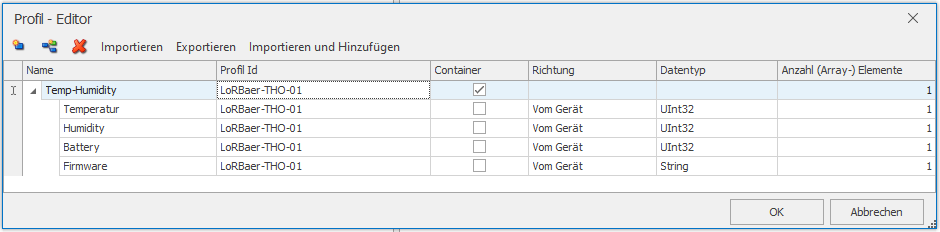
Device profiles (profile editor):
In the device profile editor, corresponding subentries of a LoRa device or for a complete device series can be created.
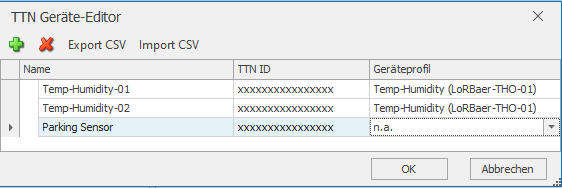
Channels (Device Editor):
In the device editor, the devices required for data exchange can be created and additionally provided with the practical device profiles, which of course must be created beforehand.
Example (data points of a LoRa sensor/actuator with active device profile) from the communication window: