DALI emergency light is an unVisiblee server component for monitoring, checking and logging emergency lighting systems with single battery lights.
If this component is inserted, it counts as 2500 components and from 100 channels it counts as 3000 components.
Safety lighting must be checked according to legal requirements before commissioning and then at regular intervals on their ability to function. In addition, all components of the system must be constantly maintained and the results of inspection and maintenance appointments documented in writing.
The software module fulfills the following tasks:
•Triggering emergency light tests for one, or groups of emergency lights via buttons or calendars (via data points)
oFunctional exam, usually weekly
oDuration test (complete battery discharge, at least 90 minutes running time), usually every 6-12 months
oPartial duration test (intern duration test but shortened), usually monthly, time can be set in minutes (1-90 min.)
obattery search
•Automatic reading of a csv file with the luminaire information
•Storage of all test data (date, time, luminaire status, test result) of all luminaires
•Status display running tests
•Display of test results including individual error messages
•Display of tests including test result
•E-mail the test results as a csv file
•Possibility of manual triggering of tests by light
•Connection of the DALI emergency light Graphic display Component for individual luminaires for presentation in the building floor plan.
•The following messages of the self-contained luminaire are shown in the DALI emergency luminaire display:
Function test:
•Location of each luminaire in plain text
•Converter defective, yes / no
•Battery defective, battery fault, yes / no
•Failure emergency light, yes / no
•Function test passed, yes / no
•function-check was triggered, but could not be started in the given time
Duration/discharge test:
•Installation location of each luminaire in plain text
•Converter defective, yes / no
•Battery defective, battery fault, yes / no
•Failure emergency light, yes / no
•Time until battery is discharged in minutes
•Duration test was triggered, but could not be started in the specified time
•Duration test passed, yes / no
In DALI emergency lighting systems, the actual duration/discharge test is not directly time-controlled by the supervisory system (e.g. EisBaer), but is executed autonomously by the emergency lighting control gear (ECG) itself.
EisBaer only sends the trigger to start the duration test to the ECG. After that, the ECG independently decides when the test will actually be executed within the internally configured “Execution Time Delay” window. For many manufacturers, this time window is typically set to up to 7 days by default.
In practice, this means:
• EisBaer sends the trigger for the duration test.
• The ECG independently decides when the test will start within the permitted execution time window.
• Battery discharge only begins once the actual test starts.
• The discharge test continues until the battery reaches its limit and the actual available battery capacity can be determined.
• Only after completion of the test and internal evaluation is the test result reported back.
For an emergency luminaire, this can for example mean:
• Trigger sent today
• ECG starts the test several days later
• the discharge test then runs until the available battery capacity has been determined
• only afterwards is the test result reported back
The actual timing of the test execution is therefore fully controlled by the ECG itself and not by the DALI Emergency manager.
Battery check (battery capacity):
•State of charge of the battery in minutes or percent depending on the test or query
•The function query battery capacity is an optional function according to DALI emergency standard IEC 3868 - 202. the query (the test) does not have to be supported or answered by every emergency light converter.
•Depending on the test carried out, the following different results are output in the 4th byte of the communication object 33 "Emergency test result":
* For function tests there are no further details.
* For endurance tests, the operating time in emergency lighting mode up to the
complete discharge of the battery specified. (the object value corresponds
the time in 2 x minutes)
* For a partial duration test, the residual charge of the battery after reaching the
Rated duration in emergency mode. State of charge of the battery
(0 ... 254 = 0 ... 100%, 255 = no info)
* After a battery check, the currently determined battery level will be displayed here
output. Battery charge state (0 ... 254 = 0 ... 100%; 255 = no info) If
no result Present (because optional) n. d. displayed.
The course of the tests and the test results are stored in an internal database.
The component is not visible on the interface in the client.
Global data points of the component
Name |
Type |
Function |
|---|---|---|
DALI Emergency Light Manager Display |
Bidirectional |
Connection between a DALI Emergency Light and one or more DALI Emergency Light Managers. |
Diagnosis [Text] |
Output |
Error texts are output here. These can be displayedwith the "Log window"component, for example. |
Dynamic |
Folder |
See below |
Folder |
see below |
|
Trigger export |
Input |
Any signal applied to this input exports the complete test results for all luminaires to a CSV file in the project directory. The separator for this export can be configured in the component's properties. In addition, a JSON file is generated. This file is analyzed using the DALI Report feature integrated into EisBär. |
Device delay [s] |
Bidirectional |
Here the time interval between the start of the tests of the individual luminaires within a group can be selected and entered in seconds. If nothing is linked here, the default from the properties of the component applies. |
Group delay [s] |
Bidirectional |
Here the time interval between the start of the individual test groups can be selected and entered in seconds. If nothing is linked here, the default from the properties of the component applies. |
Collective messages |
Folder |
|
Status |
Folder |
|
Test Actions |
Folder |
|
Test result log [Text] |
Output |
This output shows the test results of all tests in text form. |
Data points in the "Dynamic" folder per gateway
Name |
Type |
Function |
|---|---|---|
Test request |
Bidirectional |
Requests the test for all devices connected to the gateway. |
Test result |
Bidirectional |
Outputs the test result. |
Test state |
Bidirectional |
Output about the current test state. |
Data points in the "Dynamic" --> "Gateway" --> Device folder.
Depending on the set Dali device type the data points vary
Name |
Type |
Function |
|---|---|---|
DALI Emergency light Graphical display |
Bidirectional |
This data point is used to connect the DALI Emergency Lighting Graphic Display component for individual luminaires for display in the building floor plan. This data point transmits all test and result signals in compressed form. It is also used to transmit control signals from the graphic display to the invisible component. |
Start - Function test |
Input |
A function test is triggered by any signal at this input. |
Test successful (total) |
Output |
This output is active (1) if the overall test result is positive. |
Test protocol [Text] |
Output |
This output gives the result of all tests of the luminaire in text form. |
Output test protocol |
Input |
Any signal at this input outputs the result of all tests of the luminaire as text at the output of the same name. |
Battery discharge time [min.] |
Output |
This output provides the battery discharge time as the test result of the endurance test in minutes as a floating point number. |
Battery state of charge [%] Output |
Output |
This output provides the battery state of charge after a battery scan or a function test as an integer. |
Battery state of charge test active |
Output |
This output is active (1) if a battery state of charge test is active for the luminaire. |
Operating time [h] |
Bidirectional |
This output shows the operating time of the light in hours. This is the time for which the light is installed in the system, not the time of emergency operation. The time can also be sent to this datapoint to set the value, e.g. to set the value to 0 after a replacement. |
Continuous test active |
Output |
This output is active (1) if a duration test is active for the luminaire. |
Function test active |
Output |
This output is active(1) when a function test for the luminaire is active. |
Info [Text] |
Output |
This output shows the result of the last test in text form. |
Start - Test battery charge |
Input |
A battery charge status query is triggered by any signal at this input. |
Start - Continuous test |
Input |
A continuous test is triggered by any signal at this input. |
Start - duration test |
Input |
A partial duration test is triggered by any signal at this input. |
Stop |
Input |
The currently running test is stopped via any signal at this input. |
Partial duration test active |
Output |
This output is active (1) if a partial duration test is active for the light. |
Test result - battery defective |
Output |
This output isactive (1) if the battery is defective. |
Test result - Rated duration or battery insufficient |
Output |
This output isactive (1) if the battery runtime was too short during the duration test. |
Test result - Endurance test not started |
Output |
This output isactive (1) if the duration test could not be started. This can mean, for example, that the battery was not fully charged. |
Test result - Function test not started |
Output |
This output isactive (1) if the function test could notbe started. |
Test result - Converter defective |
Output |
This output isactive (1) if the converter is defective. |
Test result - lamp defective |
Output |
This output isactive (1) if the lampis defective. |
Test result - Continuous test fault |
Output |
This output isactive (1) if the result of the duration test is negative. |
Test result - malfunction function test |
Output |
This output isactive (1) if the result of the function test is negative. |
Test result - partial duration test failed |
Output |
This output isactive (1) if the result of the partial duration test is negative. |
Data points in the "E-mail" folder
Name |
Type |
Function |
|---|---|---|
Send blind copy to (BCC) |
Bidirectional |
E-mail address to be used can be sent as text on this data point. |
Send copy to (BC) |
Bidirectional |
E-mail address to be used can be sent as text on this data point. |
Send mail to |
Bidirectional |
E-mail address to be used can be sent as text to this data point. |
Data points in the "Collective messages" folder
Name |
Type |
Function |
|---|---|---|
Collective error message - Emergency lighting converter |
Output |
This output isactive (1) if any fault is present inone or more emergency lighting converters. |
Group error message - emergency sign |
Output |
This output isactive (1) if any fault is present in one ormore emergency signs. |
Group error message - emergency luminaire |
Output |
This output isactive (1) if any fault is present in one or moreemergency luminaires. |
Group alarm |
Output |
This output is active(1) if one or more collective error messages(emergency lighting converter, escape sign or safety light) are active. |
Collective acknowledgement |
Input |
All messages are acknowledged via an ON signal at this input. The output of the collective audible alarm is switched off. |
Collective visual indicator |
Output |
This output isactive (1) if one or more collective error messages(emergency lighting converter, escape sign or emergency luminaire) are active. If a new message is received, a flashing signal is output. If all messages are acknowledged, the signal changes to the static active (1) state. |
Data points in the "Status" folder
Name |
Type |
Function |
|---|---|---|
Current battery charge status query [Text] |
Output |
This output gives the date/time and the current running battery level checks as text. |
Current endurance test [Text] |
Output |
This output shows the date/time and the currently running endurance tests as text. |
Current function test [Text] |
Output |
This output shows the date/time and the currently running function tests as text. |
Current partial endurance test [Text] |
Output |
This output provides date/time and the currently running partial endurance tests as text. |
Battery state-of-charge query batch active |
Output |
This output is active (1) when a battery level query batch is active. If the test batch is completely processed with all test groups, the output is inactive. |
Continuous test batch active |
Output |
This output is active (1) when a continuous test batch is active. If the test batch is completely processed with all test groups, the output is inactive. |
Function test batch active |
Output |
This output is active (1) when a function test batch is active. If the test batch is completely processed with all test groups, the output is inactive. |
Partial duration test batch active |
Output |
This output is active (1) when a partial continuous test batch is active. If the test batch is completely processed with all test groups, the output is inactive. |
Data points in the "Test actions" folder
Name |
Type |
Function |
|---|---|---|
Stop all tests |
Input |
Any signal at this input will stop all running tests of all test groups and luminaires. Stop commands are sent to all luminaires to stop any test that may be in progress. |
Start battery state of charge tests [All] |
Input |
Any signal on this input will start battery level polls for all test groups. |
Start battery level polls [Group] Input |
Input |
Entering an integer number at this input starts battery level interrogations for the luminaires of the group with this number. |
Start Continuous Tests [All] Input |
Input |
Any signal at this input will start duration tests for all test groups. |
Start Endurance Tests [Group] |
Input |
Entering an integer at this input starts duration tests for the luminaires of the group with this number. |
Start functional tests [All] |
Input |
Any signal at this input starts function tests for all test groups. |
Start function tests [Group] |
Input |
Entering an integer at this input starts functional tests for the luminaires of the group with this number. |
Start partial duration tests [All] |
Input |
Any signal at this input starts partial duration tests for all test groups. |
Start partial endurance tests [Group] |
Input |
Entering an integer at this input starts partial duration tests for the luminaires of the group with this number. |
Properties of the component
Name |
Standard |
Function |
|---|---|---|
Dali emergency light Channels |
0 |
The individual emergency lights are defined in a list here. These then appear in the data point folder Dynamic. |
CSV separator |
Tabulator |
Setting for the separator to be used when the log file is exported via the data point"Trigger export". |
JSON File path |
C:\ProgramData\Alexander Maier GmbH\EisBär 3.0\www\DALI_Report\DALI_Report.json |
When exporting, the test results are saved here in JSON format. They are analyzed using the DALI Report integrated into EisBär.
|
E-mail Settings |
|
Here the settings of the mail server for sending e-mails are made. |
E-mail Encoding |
System Default |
Setting option for the character set to be used: UTF8, UTF7, UTF32, Unicode (UTF16), System Default (e.g. ISO-8859-1), Unicode big endian (UTF16BE) and ASCII. |
Send e-mail to |
|
Here the recipient for the e-mail with the test results is defined. Multiple recipients are entered with ";" semicolon. |
Send e-mail to (CC) |
|
The recipient for the e-mail copy with the test results is defined here. Multiple recipients are entered separated by ";". Semicolon separated. |
Send e-mail to (BCC) |
|
Here the recipient for the e-mail blind copy with the test results is defined. Several recipients are entered separated by ";". Semicolon separated. |
E-mail with each result |
|
If this parameter is set, an e-mail is sent with each result of any test. |
Device delay [s] |
10 |
The time interval between the start of the tests of the individual luminaires within a group, in seconds, is defined here. |
Group delay [s] |
60 |
This defines the time interval between the start of the tests of the individual test groups, in seconds. |
Stop all tests at start |
X |
If this parameter is set, stop commands are sent to all luminaires when the server is started or when the simulation is started in the editor, in order to stop all tests that may be running. |
Query all test statuses at start-up |
|
Activate to query the current test status of all units at start-up. This is only active if "Stop all tests at start" is not activated. |
Query all test results at start-up |
|
Enable to query the last test results of all units at start-up. |
Status query interval [min] |
1 |
Setting for the status query interval in minutes. |
Status query device delay [ms] |
100 |
The time interval between the start of the status query of the individual luminaires within a group, in milliseconds, is defined here. |
End status query after test start |
|
If this parameter is set, stop commands are sent to all luminaires when the server is started or when the simulation is started in the Editor in order to stop all status queries that may be running. |
First endurance test Minimum runtime |
120 |
Specifies the minimum runtime for the first valid test run in minutes. |
Dali Notlicht Channels definieren
Add a message
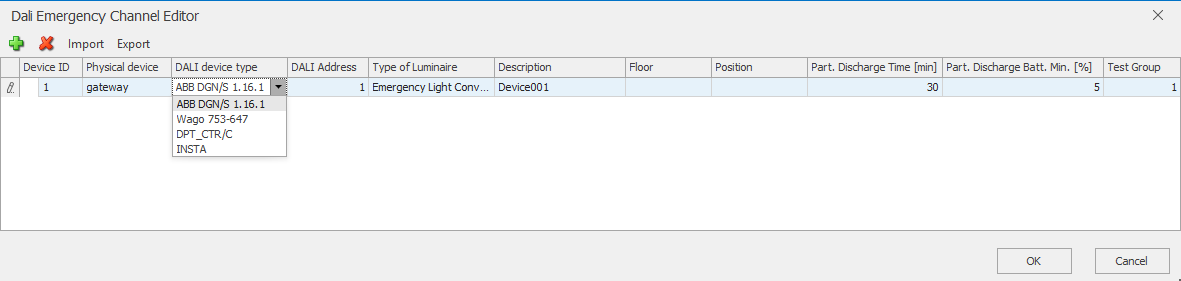
Device ID
Current ID of the emergency light channel. The ID starts with 1 and is automatically incremented when new channels are inserted. The ID is unique and unique. If a channel is deleted from the list, the deleted ID can not be reused.
Phys. device
Designation of the physical Dali device to which the light is connected. For KNX devices it is recommended to enter the physical address of the device here. The subfolders for the devices in the Dynamic folder are created from this designation and the 3 data points for communication are created.
A unique name must be assigned for each DALI Gateway.
Different designations must be used for the unit types (status) or (fault).
DALI device type
Selection of the DALI device type. Depending on the manufacturer and device type, the appropriate algorithms and data points are chosen internally.
Example emergency lighting DG/S x.64.1.1 or DG/S x.64.5.1
- In the EisBaer, the DALI device type ABB DGN/S 1.16.1 must be set.
- Example designation column "phys. Address": gateway
- In the ETS, the DGN/S1.16.1 format must be activated in the emergency lighting converter group, not for the individual emergency luminaires.
Objects 58, 59 u. 60 are used for the "Output A" for the emergency light check.
DALI Emergency Light Manager data point in the Dynamic Lighting Gateway folder |
ETS object |
|---|---|
Test request 2Octed Unsigned Value |
Start emergency lighting test adr. (DGN/S) 2byte |
Test status 2Octed Unsigned Value |
Emergency lighting test status adr. 2Byte |
Test result 4Octed Unsigned Value |
Emergency light test result adr. 4Byte |
Example DPT_237.600 Diagnostics.
- Example description Column "phys. Address": Fault
The EisBaer DALI device type DPT_237.600 (diagnostics) is used to evaluate DALI status and fault messages. These have nothing to do with emergency lighting. If necessary, the data type must be set.
A channel must be created for each Dali address to be monitored.
DALI Emergency Light Manager data point in the folder Dynamic lighting faults. |
ETS object ABB (parameter: output/fault/enable "status byte output X") |
ETS object Siemens (parameter: general/channel, activate status error) |
|---|---|---|
Test result 4 Octed Unsigned Value - 0/0/102(0/0/101) |
Object 23 or 2045 Fault addressed 2byte (DPT 237.600) - 0/0/102(0/0/101) |
Object 37 or 1062 Channel, error status 2byte (DPT 237.600) - 0/0/102(0/0/101) |
Test request 2Octed Unsigned Value - 0/0/101 |
The messages can be actively received (set in the KNX Daligateway) or polled.
When the polar bear is actively receiving (actively sending the Dali gateway), only one group address is used. This is connected to the data point test request.
For queries, 2 group addresses must be used in the communication object. The sending address sends the test result to the emergency lighting manager and an additional address receives the test request from the emergency lighting manager.
It is important that the correct data types are set in the ETS. At the moment, the DPT237.600 is not yet automatically recognised. DPT "7.* 2-byte unsigned" must be set.
Example Status ABB DG/S x.
The EisBaer DALI device type x64.x.1 (status) is used to evaluate the DALI status messages for ABB Dali gateways. This type only works with ABB Dali gateways.
In the ETS, the "Status byte" parameter must be enabled under Group/EVGx template Status / or Status. In addition, send "on change" must be activated. The messages are only actively received by the Dali Emergency Lighting Manager.
Depending on the ETS parameters "Use group x" or "Use ECG x" the following objects are used: 48, 59... resp. 224, 235...
In the ETS, DPT "7.* 2-byte unsigned" must be set . The communication objects send a 2-byte telegram(2Octed Unsigned Value).
The status must be linked for each luminaire or each group.
Evaluated is:
Bit 8: |
1 = ECG has lamp malfunction 0 = ECG has no lamp fault For group: 1, if at least 1 participant of the group has a lamp fault. 0, no participant of the group has a lamp fault. |
Bit 9: |
1 = ECG has ECG fault 0 = ECG has no ECG malfunction. For group: 1, if at least 1 participant of the group has an ECG fault. 0, no participant of the group has an ECG fault. |
DALI address
Dali short address of the light. This will be awarded as part of the Dali commissioning. The address may only be used once on a physical device.
Light type
There are three types of luminaires for selection: emergency light converter, emergency light and escape sign. This selection determines the display on the component Dali Emergency Light Graphical Display.
designation
Any alphanumeric name for the luminaire. The information is automatically transferred to the Dali Emergency Light Graphical Display component and displayed there.
floor
Any alphanumeric indication of the floor for the luminaire. The information is automatically transferred to the Dali Emergency Light Graphical Display component and displayed there.
installation
Any alphanumeric indication of the installation location for the luminaire. The information is automatically transferred to the Dali Emergency Light Graphical Display component and displayed there.
Partial time time [min.]
Defines the time of the partial duration test in minutes. During the partial duration test, a duration test is started and stopped by the system after the set partial time. Thereafter, the query of the battery state of charge takes place.
Partial battery min. [%]
Defines the minimum load after a partial endurance test required to pass the test. During the partial duration test, a duration test is started and stopped by the system after the set partial time. Thereafter, the query of the battery state of charge takes place. This must be above the defined minimum in percent and pass the test.
test group
Defines the test group to which the luminaire belongs. It will never start the tests of all lights of a building at a time. This ensures that not all emergency lights are discharged at the same time. If several test groups are used, these are staggered in terms of group delay [s].