The value dialogs of the components (e.g., button, calendar) define which values for a state are output at the respective outputs.
The designation of the respective output values is based on the definition of the DPT (Data Point Type) of the KNX standard.
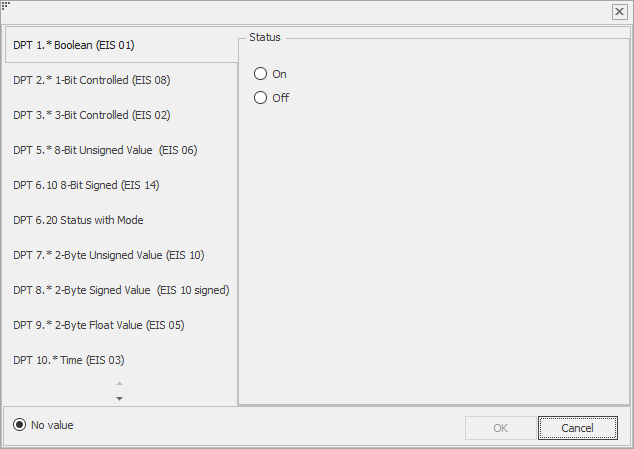
The following KNX data point types are currently supported in the EisBaer.
DPT 1. * Boolean (EIS 01)
switch; The output sends on or off switching commands.
Definition KNX: The data point type On / Off is used to switch an actuator function.
DPT 2. * 1-Bit Controlled (EIS 08)
Priority; The output sends free on, free off, prioritizes on or prioritizes off.
Definition KNX: With the help of the DPT Prio. It is possible to operate actuators - in addition to the normal operation via the DPT on / off communication object - by means of a higher-level "forced-controlled" control.
DPT 3. * 3-Bit Controlled (EIS 02)
dimming; The output sends dimming functions: up, down or stop. With a value between 0 and 7 we set the increment for up or down. At stop the dimming is stopped. The parameter "Value" is without function at "stop". After starting a dimming command, it must always be stopped. Otherwise, the dimmer dims to its maximum brightness.
Definition KNX: In addition to the 4-bit object (relative dimming - DPT 3 dimmer step), the entire "dimming" function block consists of at least one switching object (corresponds to DPT 1 on / off) and a value object (corresponds to DPT 5).
Via the 'Relative dimming' object DPT 3 (dimmer step), the dimming actuator receives a dimming command relative to the currently set brightness.
DPT 5. * 8-bit unsigned (EIS 06)
Absolute value (e.g., dimming, position); The output sends a value between 0 and 255 (8 bit, unsigned). The value is entered directly in the text box on the left, and the value in percent is entered in the text field on the right. In addition, entry via the slider is possible.
Definition KNX: With the function "Absolute dimming" (DPT percent), a brightness value between 1 (minimum) and 255 (maximum) is set directly.
DPT 6.10 8-bit Signed (EIS 14)
Absolute value; The output sends a value between -128 and 127 (8 bit / 1 byte with sign). In the text field, enter the value directly, select it with the arrow keys or adjust it with the slider.
DPT 6.20 Status with Mode
This tab defines which values and which mode an output sends. You can select multiple values, but only one mode.
DPT 7. * 2-Byte Unsigned Value (EIS 10)
16 bit value; In this register you can set a value between 0 and 65535 (16 bit / 2 byte unsigned) for the output. You can either enter the value directly in the text field, select it with the arrow keys or adjust it with the slider.
DPT 8. * 2-Byte Signed Value (EIS 10 signed)
In this register you can set a value between -32768 and 32767 (16 bit, with sign) for the output. You can either enter the value directly in the text field, select it with the arrow keys or adjust it with the slider.
DPT 9. * 2-Byte Float Value (EIS 05)
In this register you can enter an arbitrary floating point value (16 bit / 2 bytes) for the output.
DPT 10. * Time (EIS 03)
In this tab, you can enter the weekday, hour, minute, and second as the value for the output.
DPT 11. * Date (EIS 04)
In this tab you can enter the value of the day, month and year for the output.
DPT 12. * 4-byte unsigned (EIS 11)
In this register you can set a value between 0 and 4294967295 (32 bit / 4 byte unsigned) for the output. You can either enter the value directly into the text field or use the arrow keys to select.
DPT 13. * 4-Byte Signed (EIS 11)
In this register you can set a value between -214783648 and 214783647 (32 bit / 4 bytes with sign) for the output. You can either enter the value directly into the text field or use the arrow keys to select.
DPT 14. * 4-Byte Float (EIS 09)
In this register you can enter an arbitrary floating point value (32 bit / 4 byte) for the output.
DPT 15. * Access
In this tab you can set a six-digit access code for the output. In addition, you can select the following options:
error
authorization
direction
encoded
DPT 16. * String
In this tab you can enter any string for the output. Note, however, that the length is limited to 14 characters.
DPT 29.012 8-byte Signed Value
In this register you can set a value between -9223372036854775808 and 9223372036854775807 (64 bit / 4 byte with sign) for the output. You can either enter the value directly into the text field or use the arrow keys to select.
DPT 212.100 3x16 Bit Signed Float
In this register, you can enter three arbitrary floating point values (16 bit / 2 bytes) for one telegram. These values are combined and sent as a telegram.
DPT 236.001 Prioritised Scene Control
This DPT can be used to implement load shedding with switching stages or for safety critical applications where multiple levels of safety are required.
String Extended
In this tab, you can enter any extended string for the output. In contrast to the KNX string, the length is not limited to 14 characters.
Byte array
In this tab you can enter any sequence of hex values for the output.