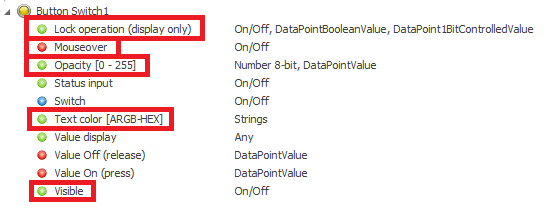
This chapter describes the general properties of the components. These are located in the communication bar of the selected component. However, this does not apply to drivers, for example.
Disable operation (display only)
If this input is not used, the component can always be operated. If the input is connected with an ON signal, the component cannot be operated. It then only has the display function. The locked status of a component is indicated by it being slightly darkened (grey) and covered by a small lock (dark grey).
Mouse over
This output can be used to start an event when the mouse is moved over the object. This function is only valid for the Windows client!
Visible
If this input is not used, the component is visible. When used, the component is switched invisible with an off signal and visible with an on signal.
Text color [ARGB-HEX]
This data point can be used to change the font color. The desired color is passed as a character string (hexadecimal value without #). It is possible to copy the color from the Brush Editor.
Opacity [0-255]
The opacity of the component can be changed via a 1 byte value from 0-255. The value 0 corresponds to complete opacity. The value 255 corresponds to the value that was set via the transparency in the properties. If, for example, 80% transparency is selected, this corresponds to the optical impression at value 255 at this data point.