This driver is an invisible server component and is used to connect the Feig-myAXXESS system with the EisBaer.
Properties of the component
Component name |
Standard |
Function |
|---|---|---|
Scanner |
0 |
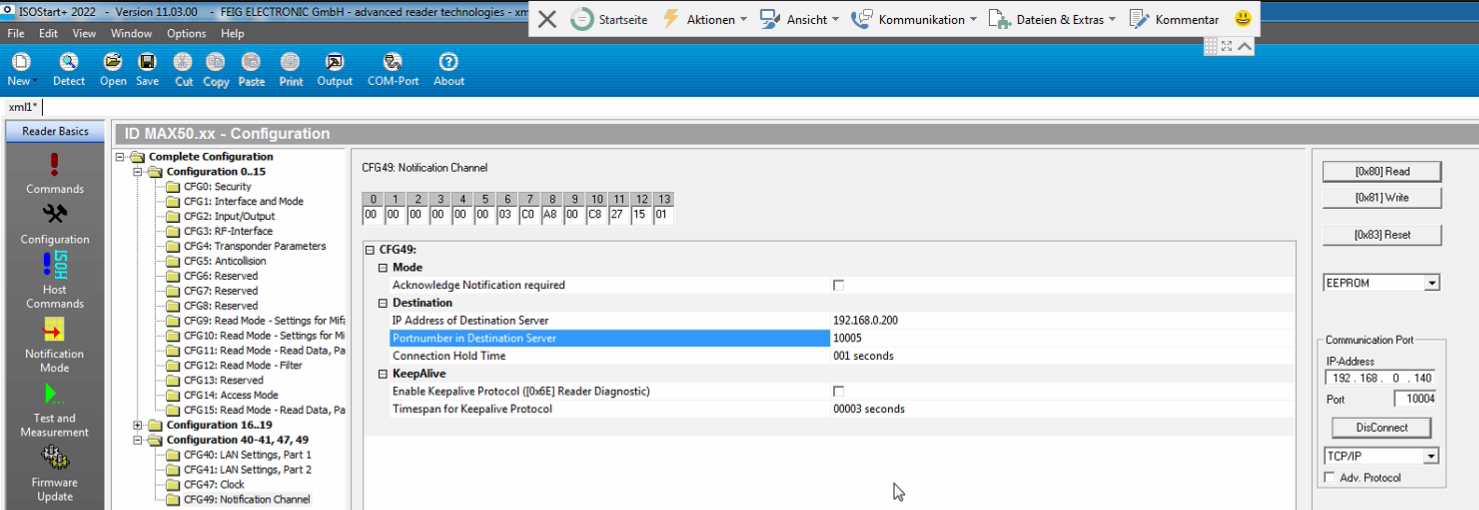
The scanners are created in this editor. - The reader name is freely definable. - The scanner address corresponds to the IP address of the respective scanner. - The notification port is used to receive the scan notifications from the individual readers. The ports must be different. "Separate notification ports" must be active in the settings for the individual notification. The IP addresses and ports must be configured in the Feig software. |
User |
0 |
Users can be created here and assigned to the card numbers. If available, several users can be assigned to a group. |
Groups |
0 |
Create groups to be able to use them in the user list. |
Communication port |
10001 |
Port for TCP communication to the scanner (input polling). This receive port of the scanner must be set in the scanner. |
Separate notification ports |
X |
If this option is active, the port specified in the channel editor is used for each scanner. This deactivates the shared notification port. |
Shared notification port |
10005 |
Port for receiving scan notifications for all scanners. |
Polling pause [ms] |
1000 |
The scanners are read out at the set time interval. |
Reconnect pause [s] |
10 |
Pause after an unsuccessful connection attempt. |
Confirm notifications |
|
If this option is activated, new notifications from a reader are only sent once the previous one has been confirmed. |
Relay activation time [s] |
2 |
Activation time for the door relay in seconds. |
Driver On/Off |
|
(De)activation of the component. |
Global data points of the component
Name |
Type |
Function |
|---|---|---|
Export user (CSV string) |
Output |
Output of the user list as text if the trigger input was triggered. |
Export User Trigger (CSV String) |
Input |
Trigger for the output of the users. |
Import User (CSV String) |
Input |
Import the users via a string. |
Export user (file name) |
Input |
By specifying an absolute save path, the user list can be exported and saved as a CSV. |
Import user (file name) |
Input |
By specifying an absolute storage path, the user list can be imported as CSV. |
Diagnosis [Text] |
Output |
Error texts are output here. These can be displayed, for example, with the"Protocol Window" component. Attention: Diagnostic or debug outputs are only intended for use in the event of an error. Please only use them in consultation with the support team! If used, these can considerably impair the performance of the service. |
Extended diagnosis |
Input |
(De)Activates the extended debug output. Caution: Diagnostic or debug outputs are only intended for use in the event of an error. Please use only after consultation with the support team! If used, they can significantly affect the performance of the service. |
Extended Diagnosis (Reader Status) |
Input |
(De)Activates the extended debug output for the reader. Caution: Diagnostic or debug outputs are only intended for use in the event of an error. Please use only after consultation with the support team! If used, these can significantly affect the performance of the service. |
Dynamic |
Folder |
The dynamic data points for each reader are created in this folder (see below). |
Calendar Editor (User) |
Bidirectional |
The Calendar Editor can be used to define the authorisation times for each user. |
Calendar Editor (groups) |
Bidirectional |
The Calendar Editor can be used to define the authorisation times for each user group. |
Export Log Data (All) |
Input |
All log data is saved in a file. |
Export Log Data (User ID) |
Input |
All log data concerning the specified internal user number are exported to a file. |
Export Log Data (Card ID) |
Input |
All access data concerning the specified card ID are exported to a file. |
Driver On/Off |
Bidirectional |
(Dis)Enable Component |
Access granted (User) |
Output |
The user name of the last access permission is output here. |
Access granted (user ID) |
Output |
The user ID of the last access authorisation is output here. |
Access granted (Card ID) |
Output |
The card ID of the last access authorisation is output here. |
Access granted (Reader) |
Output |
The name of the reader that last granted access is output here. |
Access granted (Trigger) |
Output |
An ON signal is output here when access is granted. |
Access denied (user) |
Output |
The user name of the last access denied is output here. |
Access denied (user ID) |
Output |
The user ID of the last access denied is output here. |
Access Denied (Card ID) |
Output |
The card ID of the last access denied is output here. |
Access Denied (Reader) |
Output |
The name of the reader that last denied access is output here. |
Access denied (Trigger) |
Output |
An ON signal is output here when access is denied. |
Example user CSV:
#userName;cardId;userId;Reader1,...ReaderN;restrictAccess
Markus Müller;2D28AF95;123;Door Down;false
UserName = freely selectable name
cardID = card ID*
UserID = Number of the user (freely definable)
Reader1, ... = Name of the card reader to be assigned to the user (enumeration comma-separated possible). The name of the reader must match one of the scanner names in the scanner editor list.
restrictAccess = Release via calendar true/false
* Byte swap may occur when reading out the card ID via alternative readers. The card ID should therefore be read out with the Feig software or the EisBaer.
Data points per reader
Name |
Type |
Function |
|---|---|---|
Input 1-4 |
Output |
Current status of up to 4 (depending on the reader) inputs. If the value of an input has changed and changed back during the query pause, this will be detected during the query and the output will also be set to active for a short time and inactive again. |
Calendar Editor |
Bidirectional |
Data point for linking with the calendar editor. This allows access authorizations to be controlled by time. The created users are displayed in the calendar as channels. Only in the active area is it possible for the user to authenticate himself. |
Last error code |
Output |
Output of the last reader error code. |
Export log data (All) |
Input |
All log data from this reader is exported to a file. |
Export log data (for internal user ID) |
Input |
All log data concerning the specified user ID and this reader are exported to a file. |
Export log data (for card ID) |
Input |
All log data concerning the specified card ID and this reader are exported to a file. |
Deactivate Reader |
Input |
The reader can be deactivated with an on signal. |
Actuate relay |
Input |
The door relay can be activated by any signal. |
Status code |
Output |
Output of the current status code of the reader. |
Status text |
Output |
Output of the current status text of the reader. |
Connection status |
Output |
If the connection is successful, an ON signal is output. |
Access granted (user ID) |
Output |
The user ID of the last access authorization is displayed here. |
Access granted (user name) |
Output |
The user name of the last access authorization is displayed here. |
Access granted (card ID) |
Output |
The card ID of the last access authorisation is issued here. |
Access granted (trigger) |
Output |
Here an ON signal is issued when access is granted. |
Access denied (user ID) |
Output |
The user ID of the last access refusal is displayed here. |
Access denied (user name) |
Output |
The user name of the last access refusal is displayed here. |
Access denied (card ID) |
Output |
The card ID of the last access refusal is displayed here. |
Access denied (trigger) |
Output |
Here an ON signal is issued when access is denied. |
Note:
The EisBaer server data must be entered in the CPRStart fig software under "Configuration" --> "CFG49".