This invisible driver component is intended for connection to "free@home".
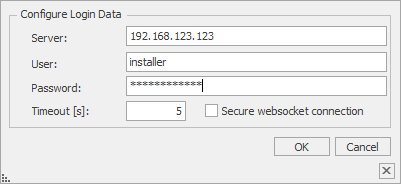
The free@home Bridge 2.0 must have at least a firmware version 2.6.x. The API must be enabled via the mobile phone APP: "free@home-Next".
This is located in the hamburger menu (bottom right), Installation Settings and then under Integrations, Enable Local API -->.
NOTE: In EisBaer it is mandatory to use the username"installer", even if the username has been changed. Since the free@home API does not accept any other user.
The password of the default user must be entered as password. This must be adjusted in the polar bear when changing in free@home.
Data points of the component
Name |
Type |
Function |
|---|---|---|
Debug [Text] |
Output |
Error texts are output here. These can be displayed e.g. with the component "Protocol window" .Attention: Diagnostic or debug outputs are only intended for error cases. Please use only with consultation of the support team! If used, these can considerably impair the performance of the service. |
Dynamic |
Folder |
The data points of the devices are displayed here. There are subfolders for the functions per device. There are different functions and display options depending on the device. |
Verbose Debug |
Input |
(De)Activates the extended debug output. Attention: Diagnostic or Debug - outputs are only intended for error cases. Please use only with consultation of the support team! If used, they can significantly affect the performance of the service. |
Eventstream Status |
Output |
Display, |
Driver On/Off |
Bidirectional |
(De)Activate Component |
Connection status |
Output |
Indicates whether the driver is On (true) or Off (false). |
Properties of the component
Name |
Default |
Function |
|---|---|---|
Connection settings |
|
Enter the Free@Home IP address and the login data for the user"installer". |
Channels |
0 |
All devices are imported and displayed here. |
Polling interval [s] |
60 |
Setting for the update time in seconds. |
Driver On/Off |
|
(De)activates the component. |
Channel Editor
Name |
Function |
|---|---|
Import from SysApp |
This reads out the gateway and imports all devices. The amount and scope of the imported devices and functions depends on whether "Hide invalid functions" is set or not. |
Import / Export |
The imported devices can be saved or loaded with this function. |
Delete |
All devices and functions are deleted. |
Hide invalid functions |
If this option is not set, all data points are imported, even if no function is stored. |
Attention:
The data points do not appear in the "Dynamic" folder until the check mark for "Use" is set.