An automatic master/slave switchover is integrated in the EisBaer SCADA client (not in the app / web app). This function enables redundant operation with two or more EisBaer servers. This is also referred to as "hot redundancy" or "hot spare". A licence is required for each server for this purpose.
Mode of operation:
The EisBaer Client switches to the next slave server if the EisBaer master server fails. If the second server fails, it switches to the third and so on. After switching to a slave server, a constant check is made to see whether the EisBaer master server is available again. If this is the case, the client automatically switches back to the master server. The master server is checked by querying the ping port. By default, the port 8003 is set. The ping on the port must be released in the network. This is already used for the access of the smart clients (apps). When changing the smart client port in the server configuration console, the port must be adjusted.
No configuration changes are necessary on the server side. All necessary settings are made in the client in the "EisBaer Server Connections" window. This is called up in the client via File - Open (Alt-O).
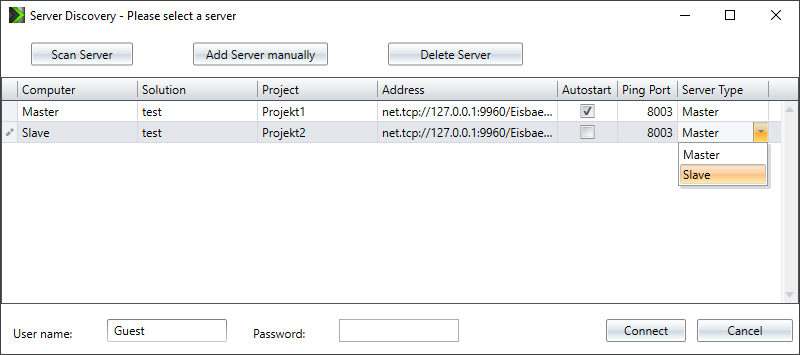
Open the server settings with key combination Alt+O or via menu "File - Open" the search console. Click "Scan Server" to discover the, in the network available, EisBaer server. This can take a few minutes. With "Add Server manually" you can type in the IP address of the EisBaer server you would like to connected to. In the column "Server Type" is defined, which server will act as the master server. All servers which are to be used as a redundant server must be set to "Server Type" slave. There can be multiple slave servers.
When starting the client, the master server must be running. It is not automatically switched to a slave server.
It must be ensured that the project statuses are the same on both servers. This can be done e.g. via "Upload project" in the editor. There is no automatic synchronization of project data between servers.
In most cases 2 servers can be operated in parallel in one installation. If this does not work, there are possibilities to activate or deactivate drivers and communication on the respective server.
Example:
The KNX driver component has the property and the data point "Send active" to allow slave servers to listen, but not to send. In the slave server project deactivate the property "Send active" by default. The slave server will send a continously ping to the master server and if it does not get an answer sets the KNX "Send active" property to "ON". On the evaluation of a heartbeat, it is also possible to trigger Alarm messages.
Important: Master and slave server should not send simultaneously, this would lead to multiple messages for e.g time programs or logics etc.
Note: The switching between slave and master server can take up to 2 minutes. During this time, an operation is not possible.