Using the "Multi Converter" component a variable amount of inputs and outputs of various data types can be defined and used in an own written parse function which converts the specific input values to
specific output values. The parse function can be freely written in C# or VB. In the output list any number of data points can be defined each by a name. In the input list any number of data points can be defined each by a name. Please always make a try {} catch(){} around the function!
The internal behavior of the component is defined inside the parser code editor.
Data points of the component
Name |
Type |
Function |
|---|---|---|
Dynamic |
Folder |
Foder for the created data points |
Properties of the component
Name |
|
function |
|---|---|---|
Inputs |
0 |
Please configure here the desired inputs. |
Outputs |
0 |
Please configure here the desired outputs. |
Parser code |
106 Bytes |
Contains the parse method for parsing the received string. |
Password |
|
Here the access to the code editor can be protected with a password. |
Store output state |
|
This option saves the states at the outputs. |
Input list
In the Input list of the Multi Converter you can define up to 999 output channels. Add channels to the list with or delete by clicking.
Name
Name of the input which is displayed in the communication window.
Output list
In the Output list of the Multi Converter you can define up to 999 output channels. Add channels to the list with or delete by clicking .
Name
Name of the output which is displayed in the communication window.
Parser Code Editor
Within this window the parser functionality will be defined.
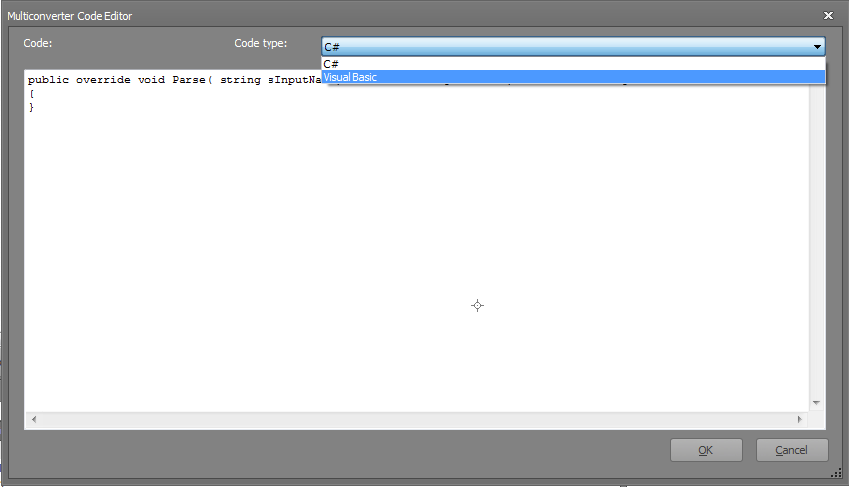
You can choose between C# and VB as programming language.
Note: The Code Editor should not be used for the development of your parse function instead you should use a separate IDE (Integrated Development Environment), for example Visual Studio .Net or SharpDevelop.
Example:
The following example converts a float data type to a string data type. The output format can be
defined thereby the decimal places can be set, additionally.
Inputs:
Format --> Input of the text output format. For example, a text input defines the format as 0.0 or 0.00.
Input --> Input for the float value.
Outputs:
Output --> Output of the string.
C# Code:
public override void Parse( string sInputName, Hashtable htInputValues,
Hashtable htOutputValues )
{
try
{
if( (sInputName != null) && (sInputName == "Input") )
{
if( htInputValues["Format"] != null )
{
string sFormat = (string)htInputValues["Format"];
sFormat = sFormat.Replace(",",".");
if( htInputValues["Input"] is DataPoint2OctetFloatValue )
{
float ValueAsFloat = ((DataPoint2OctetFloatValue)
htInputValues["Input"]).GetOctet2FloatValue();
htOutputValues["Output"] = ValueAsFloat.ToString(sFormat);
}
else if( htInputValues["Input"] is DataPoint4OctetFloatValue )
{
double ValueAsDouble =
((DataPoint4OctetFloatValue)htInputValues["Input"]).GetOctet4FloatValue();
htOutputValues["Output"] = ValueAsDouble.ToString(sFormat);
}
else if( htInputValues["Input"] is double )
{
double ValueAsDouble = (double)htInputValues["Input"];
htOutputValues["Output"] = ValueAsDouble.ToString(sFormat);
}
else if( htInputValues["Input"] is float )
{
float ValueAsFloat = (float)htInputValues["Input"];
htOutputValues["Output"] = ValueAsFloat.ToString(sFormat);
}
}
}
}
catch( Exception ){}
}
VB Code:
Public Overrides Sub Parse(ByVal sInputName As String, ByVal
htInputValues As Hashtable, ByVal htOutputValues As Hashtable)
Try
If (Not (sInputName Is Nothing)) AndAlso (sInputName = "Input") Then
If (Not (htInputValues("Format") Is Nothing)) Then
Dim sFormat As String = DirectCast(htInputValues("Format"), String
)
sFormat = sFormat.Replace(",", ".")
If TypeOf htInputValues("Input") Is DataPoint2OctetFloatValue
Then
Dim ValueAsFloat As Single = DirectCast
(htInputValues("Input"), DataPoint2OctetFloatValue).GetOctet2FloatValue()
htOutputValues("Output") = ValueAsFloat.ToString(sFormat)
ElseIf TypeOf htInputValues("Input") Is
DataPoint4OctetFloatValue Then
Dim ValueAsDouble As Double = DirectCast
(htInputValues("Input"), DataPoint4OctetFloatValue).GetOctet4FloatValue()
htOutputValues("Output") = ValueAsDouble.ToString(sFormat)
ElseIf TypeOf htInputValues("Input") Is Double Then
Dim ValueAsDouble As Double = CDbl(htInputValues("Input"))
htOutputValues("Output") = ValueAsDouble.ToString(sFormat)
ElseIf TypeOf htInputValues("Input") Is Single Then
Dim ValueAsFloat As Single = CSng(htInputValues("INput"))
htOutputValues("Output") = ValueAsFloat.ToString(sFormat)
End If
End If
End If
Catch generatedExceptionName As Exception
End Try
End Sub