With this component the weather station of Netatmo can be integrated. All measured values of the different devices are available here.
Data points of the component
Name |
Type |
function |
|---|---|---|
Update Data |
Input |
Manual update via on or off signal |
Debug |
Output |
Error texts are output here. These may e.g. with the "Log window" component. Attention: Diagnosis or debug outputs are only intended for the case of an error. Please use only after consultation with the support team! These may significantly affect the performance of the service when used |
Dynamic |
Folder |
This folder contains the global data point of the device as well as all connected modules. |
- <Name of the base station> |
Folder |
Folder with the name of the imported device |
- CO2 [ppm] |
Output |
Returns the CO2 value off. |
- Firmware |
Output |
Returns the firmware as a number. |
- Noise [dB] |
Output |
Returns the ambient volume. |
- Pressure [mbar] |
Output |
Outputs the air pressure. |
- Pressure absolute [mbar] |
Output |
Returns the absolute air pressure. |
- Pressure Trend |
Output |
Returns the air pressure trend. |
-- Module |
Folder |
see below |
- Humidity [%] |
Output |
Gives the humidity in%. |
- Temperature [°C] |
Output |
Returns the temperature. |
- Temperature Maximum [°C] |
Output |
Returns the maximum temperature. |
- Temperature Maximum Date |
Output |
Returns the time of the maximum temperature. |
- Temperature Minimum [°C] |
Output |
Returns the lowest temperature. |
- Temperature Minimum Date |
Output |
Returns the time of the lowest temperature. |
- Temperature Trend |
Output |
Returns the temperature trend. |
- WiFi Status |
Output |
Returns the WiFi status (see below). Higher values correspond to poorer reception |
- Last Upgrade |
Output |
Returns the time of the last update of the station. (Configuration of the station) |
Driver On/Off |
Bidirectional |
(DE) Activate the component |
State |
Output |
Status of communication with the Netatmo server |
Properties
Name |
Standard |
function |
|---|---|---|
Devices |
0 |
Import devices via the "Device Editor" |
User |
|
Netatmo account name |
Password |
|
Netatmo account password |
Update Interval [Min] |
5 |
Time in minutes for the data query interval |
Driver On/Off |
|
(DE) Activate the component |
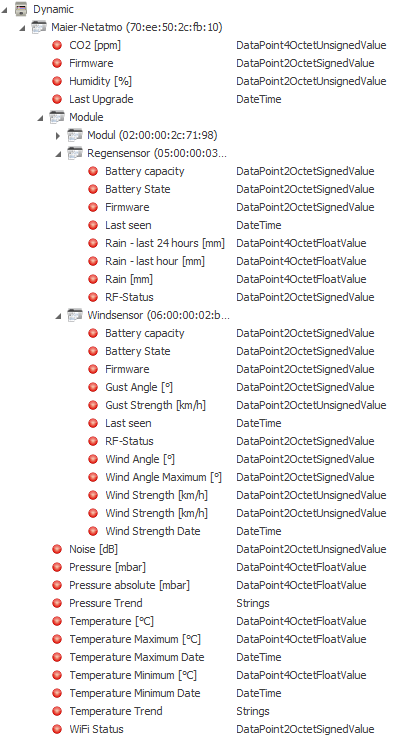
The "Dynamic" folder displays all base stations assigned to the account. Below this folder are the data points of the base station and, if necessary, a folder "modules" under which all the base station associated modules can be found. Import = download from the internet portal!
The data points available in the individual module folders depend on the type of module.
Example:
Information:
The Battery Status values are for ads, and according to Netatmo, the following areas apply:
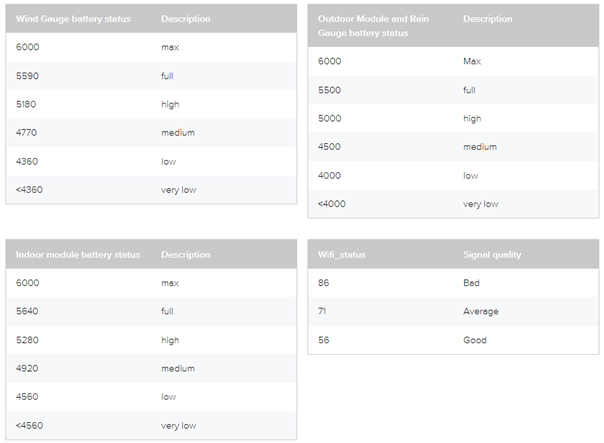
Also stated here are the WiFi status areas. Higher values correspond to poorer reception!