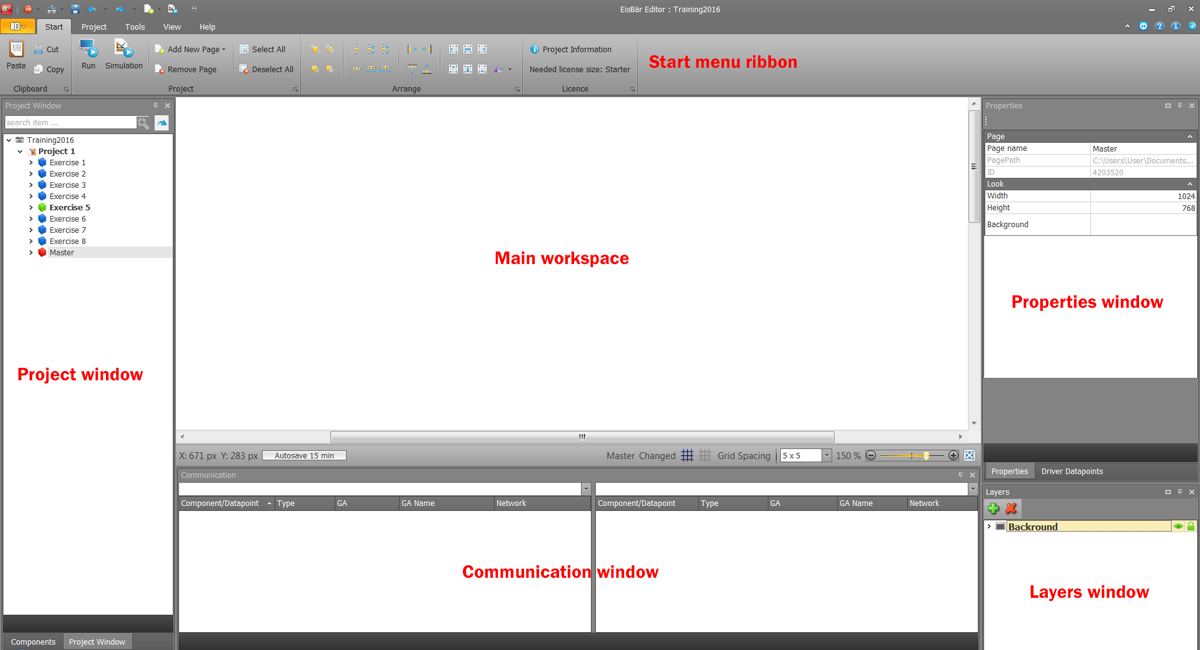
|
Especially when working on a notebook, the space on the screen is limited. The ribbon can be made smaller by pressing the arrow key. This provides more space for displaying and editing the page. |
|
AnyDeskr-Web Support, starts the remote maintenance application. This is also stored in the help tab. |
|
This icon opens the help. |
|
Here you can see the current version and the contact details of Alexander Maier GmbH. |
|
The blue tick stands for the latest version of the software. If an update is available, a red flag is displayed instead. This can be used to switch directly to the Update Manager. Alternatively,"Check for updates" can be selected via the Help tab. |




Menu lines
Description of the individual buttons in the menu bar of the EisBaer Editor. A short description is displayed at "Mouse over".

Avaiable shortcuts are:
•Ctrl+R Simulation start/stop
•Ctrl +K Open server console
•Ctrl +N New page
•Ctrl +M New master page
•Ctrl +F Fit page
•Ctrl +O Open project
•Ctrl+mouse wheel to zoom the project page