This is an invisible driver component, which is designed for the Profibus DP. Currently, the Ethernet Profibus converter IBHNet S7++ supports the company IBH.
Data points of the component
Name |
Type |
Function |
|---|---|---|
Debug |
Output |
Caution: Diagnostic or debug outputs are only in the event of failure. Please use only with consultation with the support team! This can significantly affect the performance when using the service. |
Dynamically |
Folder |
Contains the data points entered under "Register" channels. |
Driver on / off |
Bi-directional |
This allows the device to be activated/deactivated. |
Driver Status |
Output |
Indicates whether the driver is active or not. |
Cyclic update |
Bi-directional |
This can be set from another location, whether the defined channels are read out cyclically. |
Properties of the component
Name |
Standard |
Function |
|---|---|---|
Interface |
IBHNet |
Selection of the supported devices. (Currently only IBHNet S7++) |
Register |
|
In this case, the channels are created. |
Cyclic update |
|
This can be used to set whether the channels defined read cyclically. |
Pause between updates |
5 |
Defines the interval between the cyclic updates in seconds. |
Driver on / off |
|
This can be used to set whether the component at the start of the system should be active. |
Currently, the Ethernet Profibus converter IBHNet S7++ supports the company IBH.
Here is the IP address of the adapter as well as the port (by default 1099) must be entered. Furthermore, the correct MPI address (either directly or through the definition of rack and slot) can be specified.
Channels/Register
In the Channel Editor displays the defined tab that will be accessed.
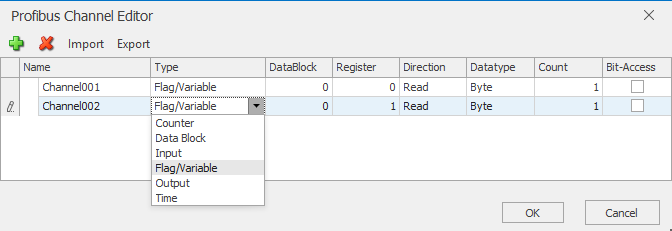
Figure : - News Editor properties
In addition to a unique name, the type (input/output) of the register/Memory/data block can be specified. If the data block has been selected, the data block must also be specified.
It is the definition of the (first) register address and the access type (read/write).
About the selection of the data type will be set at the same time, how many consecutive byte register per data point must be used.
By clicking on the count value according to a corresponding number of PLC created per channel, the consecutive values represent.
For integer values can also activate the checkbox "Bit access". This will be in addition for each date of the channel 8 Bit PLC created.
In the folder for dynamic plc is a subfolder for each defined channel is created.
The example shows the PLC for the channel. Here, Count=2 is selected, and there are accordingly 2 subfolders in the folder "values" is created. The value of the two data points is via the associated PLC "Value" is output.
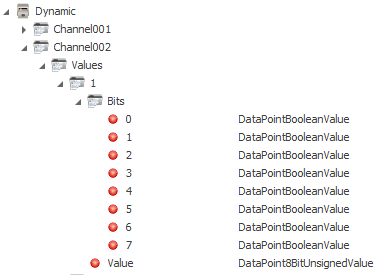
In addition, the bit access was enabled, because there is also a folder with the bit-SPs.
In the Data Item window allows the PLC to channel name, data block and register address are grouped together.