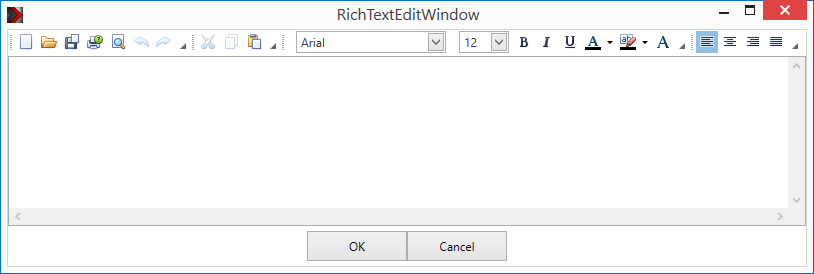
Using the 'Rich Text' component you can display a text in Rich Text Format (RTF) on the page. This text can be changed during runtime. So changeable text can be realized, e.g. as visitor guides or texts on change of room names or numbers. The text can be loaded as *. rtf directly in the component. Inserting graphics in Rich text is also possible.
The text can be send as an ASCII string on the value output e.g. to a File Logger component. The output is triggered optionally when closing the Editor by clicking OK or by triggering the input.
With an on/off signal at the data point "Visible" the component will be switched visible / invisible in runtime. An on signal switches the component visible, an off signal invisible.
Via "WPF-Theme" the appearance of this component can be varied.
Data points of the component
Name |
Typ |
function |
|---|---|---|
Lock operation (display only) |
Input |
If this input is not used, the component can be operated normally. If the input is connected with an on-signal, the component will be locked can not be operated. It only has display function. The locked state of a component is displayed, with a padlock sign on a slightly gray background. |
Mouseover |
Output |
Sends out an On signal, if you hover over the component with the mouse pointer. |
Dispatch Trigger |
Input |
True sends the text of the "RichText" Component on the Value data point |
Visible |
Input |
With an off-signal the component unVisible and with an on-signal Visible is switched. |
HTML Format |
Output |
Output, which will send the "RichText" in HTML format |
Value |
Output |
Output, which will send the "RichText" |
Input |
Over a 1-byte value of 0-255, the Opacity [0-255] of the component can be changed. 0 is complete transparency. A value of 255 corresponds to the value that was set on the transparency in the properties of the component. If for example, the transparency in the properties of the component is set to 80%, this will be the level if you send a value off 255 to this data point. |
Properties
Name |
|
function |
|---|---|---|
Send on OK |
|
Sends the text to the outputs, if the user has acknowledge the dialog with "OK" |
Send - Trigger |
send if ON or OFF |
Property of the input "Dispatch-Trigger, Send-On,Send-Off, Send-On/Off |
The text can be changed at runtime. The functions Load, Save, Print and many more are available.