This invisible component can test the server connection and issue a corresponding message about the connection status of the connected computers.
Data points of the component
Name |
Type |
function |
|---|---|---|
Test all |
Input |
Starts with On or Off all created server connection tests in the respectively set test intervals. |
Debug [Text] |
Output |
This output reports the server connection status as a text output. The diagnostic information is displayed there, linked to the [Signal] input of the log window. |
Dynamic |
Folder |
The Dynamice Folder contains one subfolder per created channel |
- Connection001 |
Folder |
For each channel, a folder is created with the following data points. |
-- Response Time [ms] |
Output |
Duration of the last response in ms. Output as an integer value. |
-- Result |
Output |
Result of the review. On (True) = connection exists, off (false) = connection is broken |
-- Check |
Input |
Starts a manual connection test with On or Off |
-- Last Check |
Output |
Returns the last check as date / time message |
-- Last seen |
Output |
Output of the time of the last online message in the format dd: MM: yyyy HH: mm: ss |
-- Next check |
Output |
Returns the next check as date / time message |
-- Last seen - Date |
Output |
Output of the date of the last online message in the format dd: MM: yyyy |
-- Last seen - Time |
Output |
Output of the time of the last online message in HH format: mm: ss |
Driver On/Off |
Bidirectional |
Switches the driver on / off |
Properties
Name |
|
function |
|---|---|---|
Connections |
0 |
Here, the servers to be monitored (network destinations) are created. |
Driver On/Off |
|
Driver on or off. |
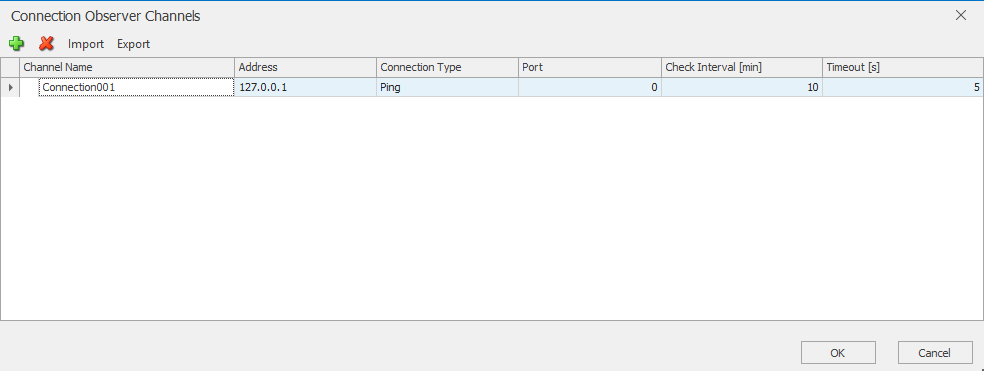
Name |
function |
|---|---|
Channel Name |
Name of the connection |
Address |
IP address of the server or IP device to be monitored, http:// or https:// incl. deviating ports are also possible. e.g.:https://meinserver.com:8080 |
Connection Type |
Selection of the type of monitoring: PING, HTTP, TCP |
Port |
Target port to be monitored (only for TCP connections). Port 80 is always used for HTTP and port 443 for HTTPS. For a different port, this must be specified in the URL. Example: http://meinserver.com:88 or https://meinserver.com |
Check-Interval [min] |
Sets the polling interval in minutes |
Timeout [s] |
Setting when the server is declared offline. |