The SONOS driver is an invisible server component with the possibility to control SONOS PLAYER.
Under Busbaer.de In the Download tab - EisBear SCADA COMP there is also a template with four players, whereby the first player is fully internally is linked.
Note: The Windows network settings must be set to "private" or "work".
These are for Windows 8.1 and higher Notes To be observed.
The basic setup of the SONOS system via the SONOS app or the SONOS Desktop Controller. Then, the individual player, each with a EisBear SONOS component as well.
Data points of the component
Name |
Type |
Function |
|---|---|---|
Add to Playlist |
Input |
Adds a selected title to the standard playlist from the SONOS device - ideal in combination with the component: "File selection". |
Album |
Output |
Specifies the name of the album from |
Artist |
Output |
Outputs the name of the interpreter |
Clear playlist |
Input |
To the current playlist is deleted. The input does not respond to. |
Composer |
Output |
Specifies the name of the composers from |
Debug |
Output |
Caution: Diagnostic or debug outputs are only in the event of failure. Please use only with consultation with the support team! This can significantly affect the performance when using the service. |
Driver On/Off |
Bidirectional |
Enables or disables the SONOS-driver in the polar bear. |
Join Group (Master UUID) [String]. |
Input |
By entering the UUID of the master Sonos, this player is added to the other (grouping). |
Mute |
Bidirectional |
Via an ON or OFF, the mute is enabled or disabled. |
Next |
Input |
An ON will advance one track in the current playlist. The input does not react to OFF. |
Pause |
Input |
This data point can be paused the playback. In the Radio Mode This such as stop responding. |
Play |
Input |
To begin playback. The input does not respond to. |
Play Media File |
Input |
A string is a song or play list. The playback begins immediately. Here is the exact path of the file to be played UMC must be entered. It is important to note that this path must be known to the SONOS, so in the music library of the SONOS. |
Play media file and return |
Input |
A title or a playlist is transferred via a character string. Playback begins immediately. The exact UMC path of the file to be played must be entered here. Please note that this path must be known to the SONOS, i.e. it must be available in the SONOS music library. If the media file has been played, the player automatically switches back to the last known source. |
Play radio channel |
Bidirectional |
A character string is an internet radio station. The playback begins immediately. There are streams with the extension *.m3u, *.pls, or *.asx allowed. Http:// At the beginning. |
Previous |
Input |
A program will be the current playlist a title jumped back. |
Sonos device offline |
Output |
Specifies whether the SONOS is online or offline. Here is a an-signal is issued, this could the Sonos device cannot be reached. |
Source - URI |
Output |
Output from the storage path of the source |
Start playlist |
Input |
Via an ON or OFF, the current playlist plays. |
Start / Stop |
Bidirectional |
About a ON/OFF the playback is stopped or restarted. |
Stop |
Input |
To the playback is stopped. The input does not respond to. |
Title / Information |
Output |
Displays the title or information to |
UUID |
Output |
Output of the unique ID of the SONOS player. |
Volume |
Bidirectional |
Sets the volume about values from 0 to 100. e.g. via the controller component or direct values or value entries. |
Volume down |
Input |
To the volume by 10%. The input does not respond to. |
Volume up |
Input |
A, the volume increased by 10%. The input does not respond to. |
Properties of the component
Name |
Standard |
Function |
|---|---|---|
IP address |
127.0.0.1 |
IP address of the player. It must be entered 127.0.0.1 If the search is used. If the search via the property "SONOS PLAYER" does not work, then you must enter the IP address of the SONOS PLAYER must be entered. |
Driver On/Off |
|
Switch driver on or off. |
Show Player Status |
|
If this setting is set, the information from the Sonos is output at the bidirectional data points. |
Query status cyclically (polling) |
|
With this selection, the status of the connected SONOS player is read out cyclically every 30 seconds. |
Sonos Player |
|
Search dialogue for the search of SONOS players in the local network. They must not be in the same group when they are first integrated. |
If the search function does not yield a result (e.g. due to blocked ports) is the connection via the IP address. The IP addresses of the SONOS player in the Sonos Desktop Controller/App, in the Help menu under "About my Sonos System" is displayed. It is important to note that the IP address of the SONOS PLAYER then in the DHCP server to assign the lease time is or should be increased accordingly, otherwise the connection can be lost to the player, since the player does not with a fixed IP address.
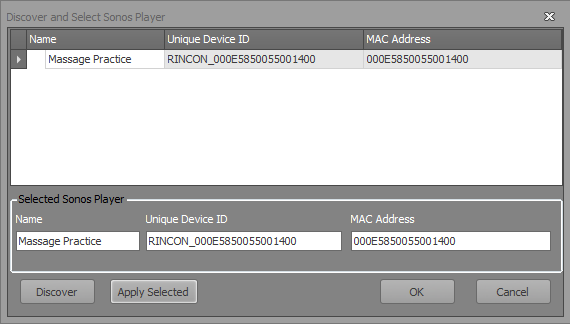
At the moment to search must be twice the "Search" button.
The list displays all the available SONOS PLAYER. Select the desired player is and will be in accordance with the "Accept Selection".
Possible radio stations can be found at https://rrradio.de/radiosender/