This component compares the input value to a stored comparison value. If these values match, the signal set under Send value will be transmitted. Any values can be used for this purpose.
Data points of the component
Name |
Type |
function |
|---|---|---|
Dynamic |
Folder |
Contains the outputs of the parser. |
Input |
Input |
Here you can enter any format you want to compare. |
Properties
Name |
|
function |
|---|---|---|
Output list |
0 |
Defines the outputs (see picture below) |
Outputliste:
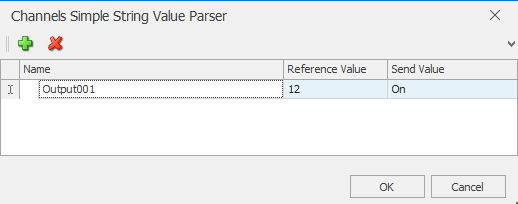
Outputs can be added via the green plus and removed via the red X.
The input data is compared with the comparison value. If these match, the corresponding send value is transmitted.
Attention!: The entered name may only be used once!