This is the indicator of the alarm clock. Via "WPF-Theme" the appearance of this component can be varied.
The buttons "Napping" and "Alarm off" are only displayed when creating and when the alarm is active.
Data points of the component
Name |
Typ |
function |
|---|---|---|
Lock operation (display only) |
Input |
If this input is not used, the component can basically be operated. If the input is connected with an on signal, the component can not be operated. It then only has display function. |
Mouseover |
Output |
This output can be used to start an event when the object is moved by mouseover. |
Visible |
Input |
With an off-signal the component unVisible and with an on-signal Visible is switched. |
Input |
||
Alarm Clock |
Bidirectional |
Communication Channel to alarm clock. Must be connected to an alarm clock component |
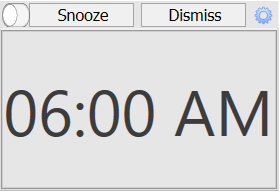
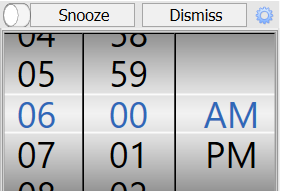
- The alarm clock is activated via the switch in the upper left corner.
- Double-click on the displayed alarm time to set the alarm time via the setting wheels. To do this, move the thumbwheel up or down and double-click on the time.
- The top right wheel opens the channel editor. Here all channel settings are changeable.
- If an alarm is active, 2 buttons appear in the title bar. Snooze activates Snooze mode. The alarm output of the alarm is turned off for the configured snooze time. This functionality is only active during the alarm period. "Alarm off" switches off the alarm output.