The consumption value display is a Visible Client component. It serves to display and operate the consumption value storage.
To use the consumption value display, it must be connected to a consumption value storage. It is possible to connect several consumption value displays with a consumption value store, but not vice versa several consumption value stores with a consumption value display.
Data points of the component
Name |
Type |
function |
Reload |
Input |
If the input is triggered with any signal, the consumption value display reloads the current view. The behavior corresponds to the operation of the reload button. |
Lock operation (display only) |
Input |
If this input is not used, the component can basically be operated. If the input is connected with an on signal, the component can not be operated. It then only has display function. |
Consumption Value storage connect |
Bidirectional |
Connection between a consumption value storage and one or more consumption value displays. |
Mouseover |
Output |
This output can be used to start an event when the object is moved by mouseover. |
Visible |
Input |
With an off-signal the component invisible and with an on-signal Visible is switched. |
Input |
Client-View
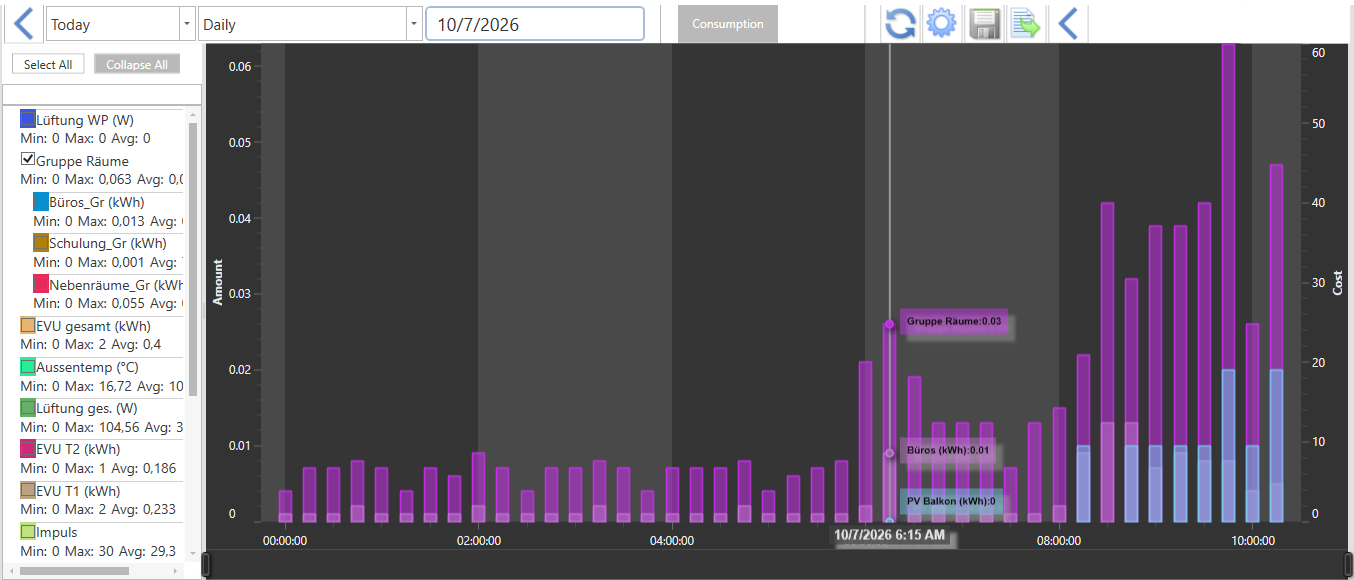
The icons / menus of the title bar from left to right:
Slide(<): |
Show or hide the channel selection list. Here, the channels or groups are selected for display. |
|---|---|
Quick selection (for example, today): |
Here, the queries are made automatically without further setting of date. |
selection (for example daily): |
Here, the query of a specific type based on the selected time range takes place. |
Time range: |
According to the selected selection, the time range for the evaluation is set here. |
Consumption / Costs: |
This button toggles between consumption display and cost display. The consumption scale is on the left side, the cost scale on the right side in the diagram. |
Reload: |
Pressing this button triggers the reloading of the data. The data in the diagram are not automatically updated. A query or a reload must be triggered in each case to obtain current measured values.. |
Gear (Channel editor): |
Pressing this button triggers reloading the data. The data in the chart is not automatically updated. In each case a query or a reload must be triggered in order to obtain current measured values. |
Floppy Disk |
Export the currently displayed values to a CSV file. Save location: C:\ProgramData\Alexander Maier GmbH\EisBär 34.0 \Export |
Export icon |
Export the currently displayed values as raw server data to a CSV file. Save location: C:\ProgramData\Alexander Maier GmbH\EisBär 34.0 \Export |
Slide (>): |
Show or hide the chart setting menu. Here the graphic settings of the diagram are selected. |
channel Editor
With the button "Channel counter reading import" it is possible to import offline counter readings into the consumption value storage.
With the button "Channel counter status export" it is possible to export all counter readings of a channel. This process takes a long time depending on the number of data points. The file is saved on the Eisbaer client PC in folder C:\ProgramData\Alexander Maier GmbH\EisBaer 3.0\Export.
IMPORTANT: It is NOT possible to import/export from a pulse channel!
In the Channel Editor, some channel settings can be changed in the Polar Bear Client.
Name: |
not changeable |
|---|---|
Data type: |
not changeable |
Colour: |
Here, the display color for the display is defined in the consumption value display. |
Consumption factor: |
This factor multiplies the incoming value. If the counter is e.g. Wh supplies these but should be represented as kWh, the factor would be 0.001. |
Consumption Unit of measure: |
Unit of measure of the measured, e.g. kWh, litres, m³, ... |
Cost factor: |
Here the cost factor is entered. This is then multiplied accordingly with the consumption. |
Cost Unit of measure: |
Unit of cost, e.g. €. |
Consumption budget: |
Sum of the daily budget. If this value is exceeded in the trend calculation, the output consumption Trend Budget Alarm is set to. |
Consumption budget factor: |
This factor is used to multiply the displayed value, e.g. to convert from kWh to MWh. |
Consumption Budget Unit of Measure: |
Unit of measure of the budget |
Cost Budget: |
Sum of the daily budget. If this value is exceeded in the trend calculation, the output consumption Trend Budget Alarm is set to. |
Cost budget factor: |
This factor is used to multiply the displayed value, e.g. make a conversion from to t €, or convert the € into $. |
Cost Budget Unit of Measure: |
Unit of measure of the budget |
User: |
not changeable |