Data points of the component
Component name |
Type |
Type Function |
|---|---|---|
Diagnosis [Text] |
Output |
Outputs a protocol text. Attention: Diagnostic or debug outputs are only intended for use in the event of an error. Please only use them after consulting the support team! If used, they can significantly impair the performance of the service. |
Extended diagnostics |
Input |
Enables extended diagnostics. |
Device instance ID |
Bidirectional |
The unique instance ID for each server in a BACnet network can be changed here. |
KNX Gateway - Number of objects in send queue |
Output |
Outputs the number of objects in the send queue. |
KNX Gateway - Delete send queue |
Input |
Deletes the entire send queue. |
Statistics |
Folder |
Contains data points to obtain statistical data on communication. |
Driver On/Off |
Bidirectional |
Switch driver on or off. |
Driver Gateway - KNX |
Bidirectional |
Bidirectional communication interface between BACnet server and KNX.See Gateway driver. |
Gateway driver - Modbus Master |
Bidirectional |
Bidirectional communication interface between BACnet server and Modbus master.See Gateway driver. |
Gateway driver - MQTT client |
Bidirectional |
Bidirectional communication interface between BACnet server and MQTT client.See Gateway driver. |
Dynamic |
Folder |
The data points created in the channel editor are mapped in this folder. |
- Unit |
Output |
If a unit ID is assigned in the EDE file, the corresponding text from the unit editor is displayed here. |
- Limit value under-exceeded |
Output |
If limit values have been created in the EDE file for the corresponding value, this data point triggers when the limit value is exceeded or not reached. |
- Text representation |
Output |
The text corresponding to the status is displayed here if one has been created in the status text editor. |
- Value |
Output / Bidirectional / Input |
The value is displayed here. The type depends on the data point. |
The Value Outputs are clearly divided by object Types. All Data Points of the Type Analog Value can be found in the Subfolder "Analog value," all Objects of the Type Of Binary Input are in the Subfolder "Binary input," etc.
Properties
The component can be configured via the properties.
Name |
Standard |
Function |
|---|---|---|
Communication settings |
... |
Setting the connection via UDP, TCP or Secure. |
Channels |
0 |
The individual channels are defined in a list here. These then appear as an output in the Dynamic data point folder. |
Properties |
23 |
List of BACnet-specific properties that can be assigned an initial value. |
Units |
418 |
This editor can be used to assign corresponding unit texts to the unit IDs. The default BACnet assignment is available at the start. Customised assignments can be imported or changed manually. Unit IDs can be referenced in the BACnet object editor. |
Status texts |
0 |
This editor can be used to assign up to 15 status texts to the status text IDs. Status IDs can be referenced in the BACnet object editor. |
Use Boolean for binary objects |
|
If this option is set, a true or false is transmitted instead of 0 or 1. |
Use UTC time |
|
Set for UTC time, otherwise CET. |
Device instance ID |
1 |
The unique instance ID for each server in a BACnet network is defined here. |
Device instance Object name |
Eisbaer Server |
Specify the object name to be able to assign the device more easily (manufacturer information). |
Device instance Model name |
Eisbaer Dataset Collection |
Specify the model name to be able to assign the device more easily (manufacturer information). |
CoV support |
x |
CoV is a subgroup of "Alarm and Event Services" that solves a problem where field devices are passive servers. |
Single thread CoV handling |
x |
In individual cases, this option can be set to achieve higher performance. |
Prioritised property handling |
|
When a client starts a query, this is prioritised to avoid client timeouts. |
Only one subscription per client and object |
|
If activated, only one subscription per client and object is permitted. If an object is subscribed to multiple times by a client, older subscriptions are replaced, even if the new one has a different process ID. |
KNX Bridge/Gateway - Queue Size |
1000 |
If a send delay is available, the maximum queue size of the telegrams that are to be sent with a delay is specified here. |
KNX Bridge/Gateway - Object delay [ms] |
0 |
Send delay between two telegrams to the KNX gateway. |
Start delay [s] |
2 |
Delays the start of the driver to avoid faulty data. |
Driver on/off |
|
Switches the driver on or off. |
Communication settings:
General:
Name |
Standard |
Function |
|---|---|---|
Timeout |
2000 |
Timeout for the ACK during read/write. |
Number of repetitions |
2 |
Number of repetitions if the ACK does not occur. |
Window size |
20 |
[1-127] Segmentation is used in BACnet when transmitting large amounts of data. The maximum number of open unconfirmed sent messages is "negotiated" when the connection is established. This parameter determines which "window size" (i.e. the number of unconfirmed messages) is suggested by this device. With the CX8091, this value must be reduced to 4, as otherwise file accesses will not work due to small network memories. |
Max Segments |
MAX_SEG65 |
If this option is active, UDP fragmentation is prevented. |
UDP
Name |
Default name |
Function |
|---|---|---|
Port |
47808 |
The local port to be used by the component is entered here. The BACnet server listens on this port. Port 47808 (0xBAC0) is used by default. 0xBAC0 - 0xBACF are reserved for BACnet. If BACnet devices are on different ports, they are also in different networks and cannot communicate with each other. |
Exclusive |
X |
This defines whether the specified port is used exclusively or shares the port with other BACnet components. Exclusive use must be deactivated if the server and client are running on the same machine or if there is another BACnet server. |
Local IP address |
127.0.0.1 |
Setting the local IP address |
Do not fragment |
|
With this option, the data packets are not split. |
Max payload |
1472 |
The specification in [bytes] refers to the raw data, without the 28bytes IP header. |
TCP
TCP name |
Standard |
Function |
|---|---|---|
Network adapter name |
|
Name of the network adapter; example: Ethernet2 |
Secure (SC)
Network adapter name |
Standard |
Function Name |
|---|---|---|
UUID |
|
Own unique name |
Primary HUB URI |
|
Server address of the primary BACnet HUB |
Fallover HUB URI |
|
Server address of the secondary ("fall-back") BACnet HUB |
Direct connect |
|
This option must be set if no HUB is available. |
Certificate file |
|
Entry of the storage path to the client certificate [.p12] |
Certificate password |
|
Enter the password for the certificate |
HUB certificate |
|
Enter the storage path to the HUB certificate [.p12] |
verify Remote Certificate |
|
Set whether the HUB certificate is to be used or not. |
Channels:
Example after a KNX (CSV) import.
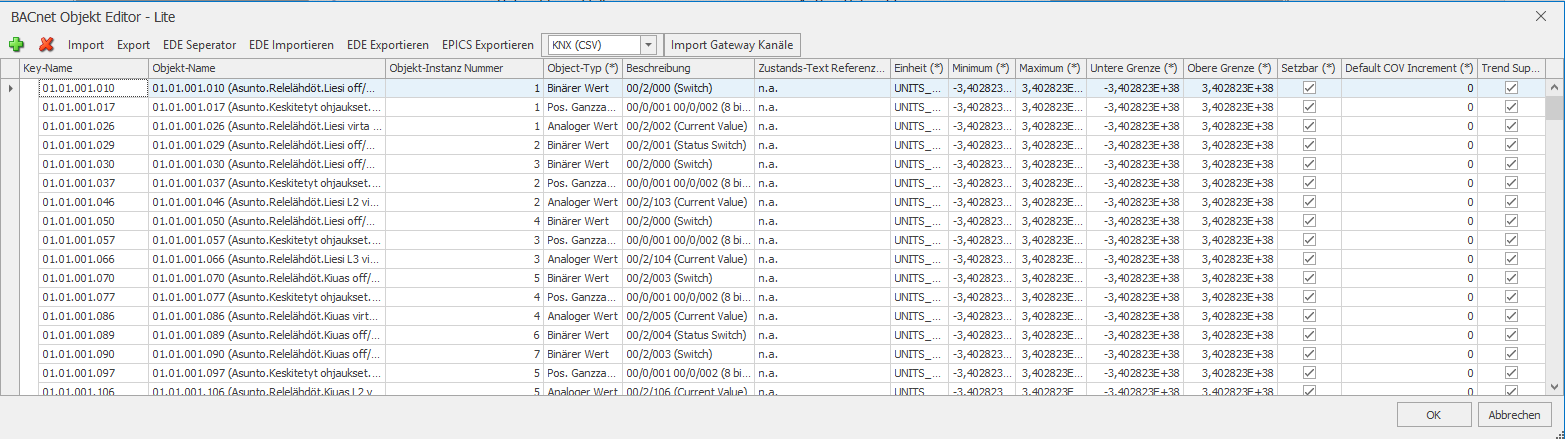
New channels can be added using the +.
The x deletes the selected channel.
Import / Export is used to back up the channel list.
This can be set explicitly via EDE Seperator. The separator is normally recognised automatically.
EDE/EPICS Import / Export is for the import/export of EDE files. These can also be imported/exported in the BACnet client. The table of units and status texts are also exported.
The"Import gateway channels" button is used to import KNX or Modbus data (see Gateway driver).
Validation Check: This can be used (after an EDE import) to check whether the data set contains errors (duplicates).
Designation |
Key description |
|---|---|
Key name |
Unique key of the channel. This can be numbers or text. |
Object name |
Name of the channel. |
Object instance number |
There must be a unique object instance number for each individual object type. |
Object type |
Specifies which object type is used for this channel. |
Description |
Additional information about the channel can be entered here. |
Status text reference |
Selection option for a text reference that can be defined in the "Status texts" settings (separate editor). |
Unit |
Selection of the unit of the value. |
Minimum |
Setting for the smallest permissible value. |
Maximum |
Setting for the highest permissible value. |
Lower limit |
If the value falls below the set limit, it is recognised as an "error" by BACnet and could trigger another function. |
Upper limit |
If the set limit is exceeded, it is recognised as an "error" by BACnet and could trigger another function. |
Can be set |
Object types that can be changed by default on the BACnet side can be protected against changes or enabled. |
Default COV increment |
The default COV increment defines the minimum value by which an attribute of an object must be changed for a COV notification to be triggered. If the value of the monitored parameter rises or falls by this increment value or more, a notification is sent to the corresponding BACnet participants. |
Trend support |
Set to create a value history. Otherwise, only one value is stored. |
File as object
The File object type provides the three data points required for elementary read and write commands. When writing to data, the transferred bytes are written to the set/current position. With the read trigger, the desired number of bytes is read from the set/current position and output to the data point data. The position is updated accordingly when writing and reading.
Schedule:
A schedule object always includes a set of value objects, as well as zero or more time points for each day of the week, at which all value objects are assigned a value for the time point. The default value is set at 0 o'clock on each day (unless an "appointment" is defined for this time). A schedule has an optional start and end date on which this schedule is valid.
The appointments are coloured according to the values you set. The colour is determined randomly at the start, but is constant at runtime. The default dates are always grey.
If a switching time is to be changed, ALWAYS edit the series! When changing the time, only the start time (and here only the clock time) is relevant.
The value assigned to the switching point is specified in the event in the description and can only be changed there.
If a new switching point is to be added, a "weekly repetition type" with exactly one day only must be set.
Driver Datapoints
The Data Point Window shows all SPs as well as the associated object ID.