The gateway function is used to establish direct bidirectional communication between drivers. This eliminates the need to link individual channels together. The following drivers support this function:
Connections:
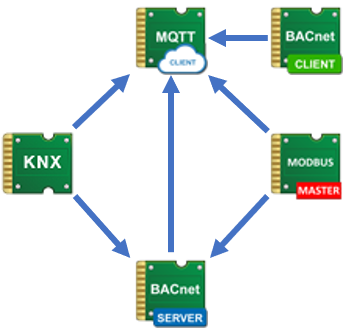
Link data points
Sending driver |
Data point |
Data point type |
Data point |
Receiving driver |
Function |
|---|---|---|---|---|---|
KNX |
Driver Gateway - MQTT Client |
Bidirectional |
Driver Gateway - KNX |
MQTT Client or Broker |
Connection data point between KNX and MQTT |
KNX |
Driver gateway - BACnet server |
Bidirectional |
Driver Gateway - KNX |
BACnet Server |
Connection data point between KNX and BACnet server |
BACnet Server |
Driver gateway - MQTT client |
Bidirectional |
Driver gateway - BACnet server |
MQTT Client or Broker |
Connection data point between BACnet server and MQTT |
Modbus Master |
Driver Gateway - BACnet Server |
Bidirectional |
Driver gateway - Modbus master |
BACnet Server |
Connection data point between Modbus master and BACnet server |
Modbus Master |
Driver gateway - MQTT client |
Bidirectional |
Driver gateway - Modbus master |
MQTT Client or Broker |
Connection data point between Modbus master and MQTT |
BACnet Client |
Driver gateway - MQTT client |
Bidirectional |
Gateway driver - BACnet client |
MQTT Client or Broker |
Connection data point between BACnet client and MQTT |
import
Import name |
Function name |
|---|---|
KNX (CSV) |
In order for the KNX data points to be generated in the MQTT or BACnet server, an export as "CSV (TAB)" from the data point list of the KNX driver and subsequent "KNX (CSV)" import in the channel list of the MQTT or BACnet server is required. |
KNX (XML) |
To generate the KNX data points in the MQTT client or the BACnet server, an XML export from the group address window of the ETS and subsequent "KNX (XML)" import in the channel list of the MQTT client or BACnet server is required. |
Modbus master |
To generate the Modbus master data points in the MQTT or the BACnet server, an export as xml from the data point list of the Modbus master driver and subsequent "Modbus" import in the channel list of the MQTT or the BACnet server is required. |
BACnet server |
To generate the BACnet server data points in the MQTT, an export as XML from the data point list of the BACnet server driver and subsequent "BACnet (server)" import in the channel list of the MQTT is required. |
BACnet client |
In order for the BACnet client data points to be generated in the MQTT, an export as XML from the data point list of the BACnet client driver and subsequent "BACnet (client)" import in the channel list of the MQTT is required. |
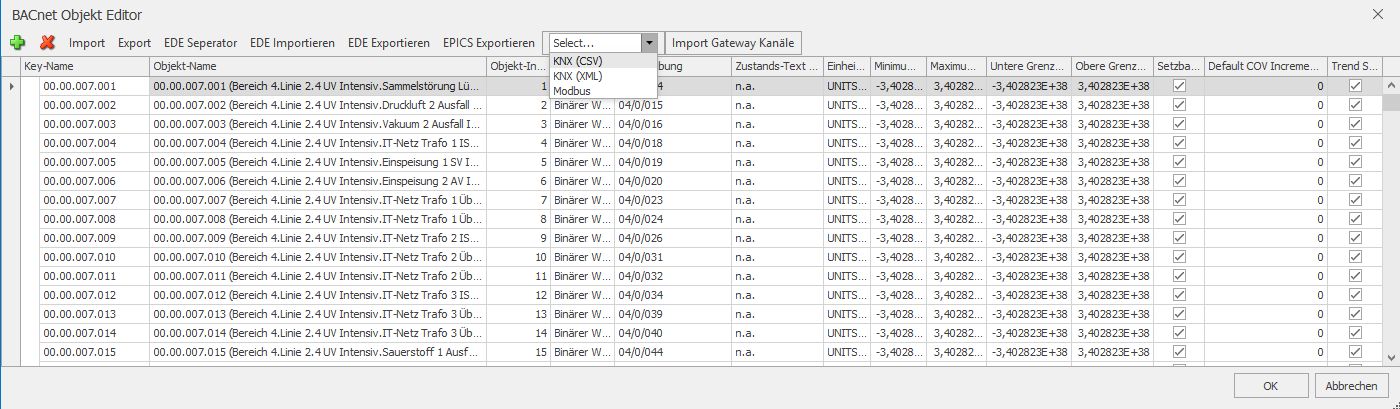
Example KNX import from EisBaer KNX driver export in the Bacnet channel editor:
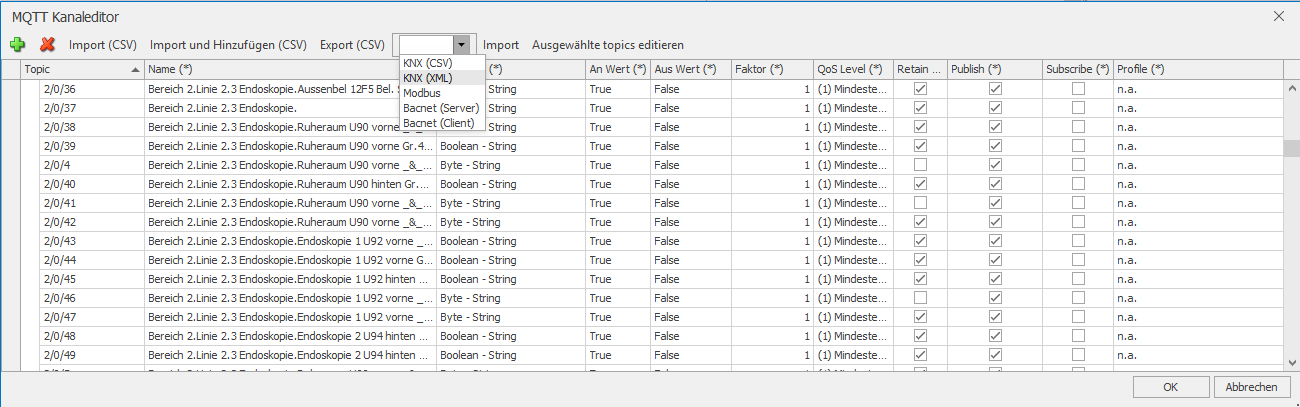
Example KNX import from ETS group address export in the MQTT channel editor:
Notes:
Data import and / or manual data point input
In the "normal case" (all required objects have been imported and the connection is only made via the gateway data point), control elements can be connected to the KNX component, for example. If a command is triggered there, it goes to the KNX bus on the one hand and is sent to BACnet via the gateway DP on the other. Similarly, the control element could also be connected to the corresponding BACnet data point - in this case, the Bacnet sends the value directly and in parallel to the KNX via the GW.
In the Bacnet channel, there is a "DriverGatewayReference" property that is set with a unique reference of the external system during gateway import. In the case of KNX, this is the physical address (csv) or the name (xml).
If a change is made via the gateway data point, the DriverGatewayReference is used to check which Bacnet channel corresponds to it. This DriverGatewayReference does not have a visible column in the channel editor and can therefore currently only be set via an import. Subsequently manually created Bacnet channels can therefore not be mapped to KNX objects, as the input option is missing (workarount via Export - Edit - Import channel list is possible). If such channels are created manually and have a counterpart on the KNX side, the corresponding data points must be explicitly linked.
If an action is triggered on the KNX side or by a control element that is linked to both data points (KNX and Bacnet), it is only sent once to the respective bus on both the KNX side and the Bacnet side.
If KNX values are sent twice (e.g. once at the trigger input and then back from the bus), this is debounced on the Bacnet side. If the same value is sent cyclically, there must be at least 500ms before it is sent again on the Bacnet side.