This editor can be used to assign up to 15 status texts to the status text IDs. Status IDs can be referenced in the BACnet object editor.
Data points of the component
Component name |
Type |
Type Function |
|---|---|---|
Query once |
Input |
The query of all data points can be triggered manually once via "Update". |
Query cyclically |
Bidirectional |
Cyclical query |
Enable all values |
Input |
With "Relinquish All Values", all values on the servers are withdrawn. |
Notifications [Text] |
Output |
Output of all notifications as text. |
Diagnosis [Text] |
Output |
Attention: Diagnosis or debug outputs are only intended for use in the event of an error. Please only use them after consulting the support team! If used, they can significantly impair the performance of the service. |
Display |
Bidirectional |
Data point for the connection to the BACnet client display. (Currently without function) |
Dynamic |
Folder |
The dynamic data points are created in this folder. |
- Device status |
Output |
Indicates whether communication with the server is possible (if an object has been selected for the server in the channel editor as "Use as status indicator"). |
- Withdraw all values |
Input |
Trigger to withdraw the values for all objects belonging to the server (so that they can be written by other clients with a lower priority if necessary). |
-- Device1 |
Folder |
|
-- Withdraw all values |
Inbox |
This withdraws all values on the device. |
-- Device status |
Output |
There is a device status for each server. If cyclical polling of the server status is activated, this data point indicates whether the server is accessible or not. |
--- Channel001 |
Folder |
|
--- Text Representation |
Output |
The text corresponding to the status is displayed here if one has been created in the status text editor. |
--- Unit |
Output |
If a unit ID is assigned in the EDE file, the corresponding text from the unit editor is displayed here. |
--- Value |
Bidirectional |
The value is displayed here. The type depends on the SP. |
--- Limit value under-exceeded |
Output |
If limit values have been created in the EDE file for the corresponding value, this data point triggers when the limit value is exceeded or not reached. |
--- Withdraw value |
Input |
Triggers to withdraw the values for all objects belonging to the device (so that they can be written by other clients with a lower priority if necessary). |
Extended diagnosis |
Input |
(De)activate extended debug output |
Local IP (UDP) |
Bidirectional |
The IP address of the driver can be changed here at runtime. |
Server status |
Output |
The data point is true if at least one of the servers can be communicated with. |
Query server status cyclically |
Bidirectional |
Cyclical polling can be switched on/off via a button. |
Statistics - number of COV messages |
Output |
Number of "Change of value" messages since start. |
Statistics - Number of poll requests |
Output |
Number of Who-Is requests since start. |
Statistics - Number of poll request errors |
Output |
Number of Who-Is request errors since start. |
Statistics - Number of subscription errors |
Output |
Number of poll request errors since start. |
Statistics - Number of subscription requests |
Output |
Number of requests since start. |
Driver Gateway - MQTT Client |
Bidirectional |
Bidirectional communication interface between BACnet client and MQTT client.See Gateway driver. |
Driver On/Off |
Bidirectional |
Component to be (de)activated at runtime |
Schedule |
Folder |
Contains the schedule data points to set values at a specific time. |
-- Current value |
Output |
Output for the value to be sent |
-- End date |
Bidirectional |
End date for the validity period. |
-- Calendar editor |
Bidirectional |
Data point for the Calendar Editor component. |
-- Default value |
Bidirectional |
Input/output of the default value |
-- Start date |
Bidirectional |
Start date for the validity period. |
-- Text representation |
Output |
Summary of all dates as text. |
For the sake of clarity, the value outputs are divided into servers and object types. All data points of the analogue value type can be found in the "Analogue value" subfolder, all objects of the binary input type are in the "Binary input" subfolder, etc.
For "commandable" objects (these are the value or output data types of binary, analogue and multistate), a "Relinquish" data point is also created to reset written values so that clients with a lower write priority can also reset these values on the servers.
Properties
The component can be configured via the properties.
Name |
Standard |
Function |
|---|---|---|
Communication settings |
... |
Setting the connection via UDP, TCP or Secure. |
Device ID |
528 |
Setting option for the unique device ID. |
Channels |
0 |
The individual channels are defined in a list here. These then appear as an output in the Dynamic data point folder. |
Devices |
0 |
Displays the connected devices. |
Sequential device polling |
|
If active, all devices are polled one after the other, otherwise in parallel. |
Poll all objects |
|
If active, unconnected objects are also polled. |
COV registration interval [min] |
60 |
The interval in minutes at which the client should repeat its change-of-value registrations is specified here. |
Units |
418 |
This editor can be used to assign corresponding unit texts to the unit IDs. The default BACnet assignment is available at the start. Customised assignments can be imported or changed manually. Unit IDs can be referenced in the BACnet object editor. |
Status texts |
0 |
This editor can be used to assign up to 15 status texts to the status text IDs. State IDs can be referenced in the BACnet object editor. |
Message priority |
16 |
The global write priority that is used if no special priority has been defined for a channel or for the associated device/server. |
Use boolean for binary objects |
|
If this option is set, a true or false is transmitted instead of 0 or 1. |
Query server status cyclically |
X |
Here you can specify whether the server status should be queried cyclically (every 30 seconds). This refers to the setting in the "As status indicator" channel list. |
Who is interval [min] |
0 |
Sends a broadcast at the specified interval to identify the devices. 0 = deactivated |
Cancelled after X errors |
3 |
If the specified error limit is reached (by Who Is request), polling of the device is cancelled. |
Confirmed COV notifications |
|
CoV is a subgroup of "Alarm and Event Services" that solves a problem where field devices are passive servers. These are confirmed with this option. |
Driver on/off |
|
Switches the driver on or off. |
Communication settings:
General:
Name |
Standard |
Function |
|---|---|---|
Timeout |
2000 |
Timeout for the ACK during read/write. |
Number of repetitions |
2 |
Number of repetitions if the ACK does not occur. |
Window size |
20 |
[1-127] Segmentation is used in BACnet when transmitting large amounts of data. The maximum number of open unconfirmed sent messages is "negotiated" when the connection is established. This parameter determines which "window size" (i.e. the number of unconfirmed messages) is suggested by this device. With the CX8091, this value must be reduced to 4, as otherwise file accesses will not work due to small network memories. |
Max Segments |
MAX_SEG65 |
If this option is active, UDP fragmentation is prevented. |
UDP
Name |
Default name |
Function |
|---|---|---|
Port |
47808 |
The local port to be used by the component is entered here. The BACnet server listens on this port. Port 47808 (0xBAC0) is used by default. 0xBAC0 - 0xBACF are reserved for BACnet. If BACnet devices are on different ports, they are also in different networks and cannot communicate with each other. |
Exclusive |
X |
This specifies whether the specified port is used exclusively or whether the port is shared with other BACnet components. Exclusive use is necessary if the server and client are running on the same machine or if there is another BACnet server. |
Local IP address |
127.0.0.1 |
Setting the local IP address |
Do not fragment |
|
With this option, the data packets are not split. |
Max payload |
1472 |
The specification in [bytes] refers to the raw data, without the 28bytes IP header. |
TCP
TCP name |
Standard |
Function |
|---|---|---|
Network adapter name |
|
Name of the network adapter; example: Ethernet2 |
Secure (SC)
Network adapter name |
Standard |
Function Name |
|---|---|---|
UUID |
|
Own unique name |
Primary HUB URI |
|
Server address of the primary BACnet HUB |
Fallover HUB URI |
|
Server address of the secondary ("fall-back") BACnet HUB |
Direct connect |
|
This option must be set if no HUB is available. |
Certificate file |
|
Entry of the storage path to the client certificate [.p12] |
Certificate password |
|
Enter the password for the certificate |
HUB certificate |
|
Enter the storage path to the HUB certificate [.p12] |
verify Remote Certificate |
|
Set whether the HUB certificate is to be used or not. |
Channels
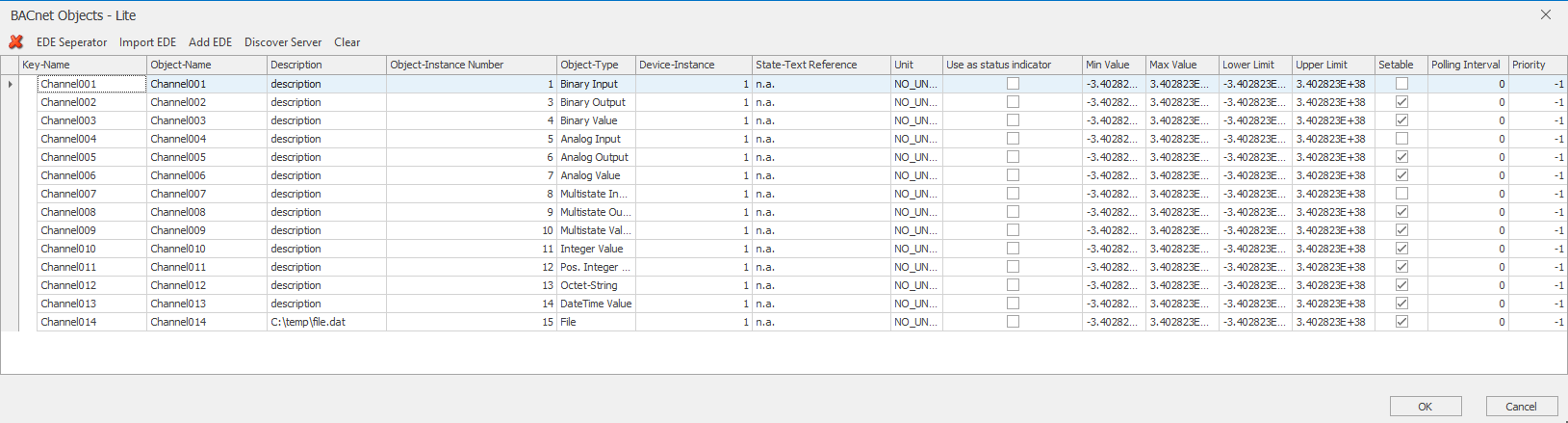
The import works cumulatively, i.e. after data points have been imported, further data points can be added via the import without affecting the existing data points. Furthermore, a data point can be selectedas a status indicatorfor each server . This is queried cyclically if the option Query server status cyclically is activated.
The text reference and the unit can be changed manually for each channel at a later date. The "Use as Status Indicator" column can also be used to select a (readable) object per device, which is read cyclically to determine whether communication is still possible with the corresponding server (this is reflected on the status SP of the device).
Furthermore, the polling type (None, Polling, Change of Value, Polling + Change of Value) and the polling interval can be defined for each channel. Please note that a channel is only polled (or COV-subscripted) if polling (or COV) is activated for both the device (see below) and the channel. The value set here applies to the polling interval, unless 0 is selected - then the interval set for the device is used.
Finally, the write priority with which a value is sent to the server can also be defined for each channel. If the server supports it, other clients with a lower priority cannot overwrite the written values until the value has been withdrawn (via an additional SP). The following applies to the priority: The priority set here is used, unless -1 is set - then the priority defined for the device is used. If -1 is also set there, the globally defined priority is used.
Search server
Attention: For the Discover, the local IP address to be used (127.0.0.1 does not work here) and the port must be set correctly!
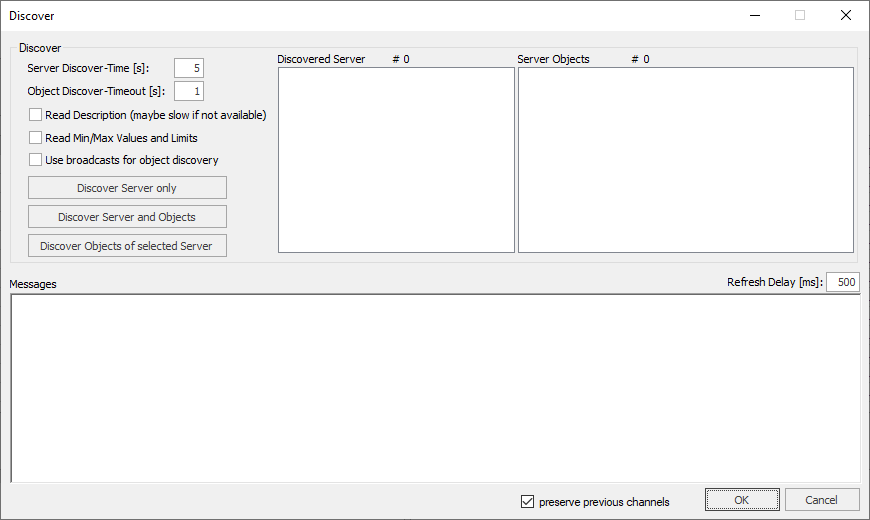
First, the wait time for the server search should be adapted to the local conditions. This time specifies how long to wait for responses from servers to submit the Discover command.
The "object read timeout", on the other hand, specifies the timeout for querying the individual server objects.
By activating "Read Description", the description of the data points is also read out. This results in a longer readout time.
You can also use a broadcast connection for the Discover-function.
Using "Determine server only", only the server responses are evaluated and the list of servers found filled accordingly. These can then be queried by right-clicking or via the button "read objects of the selected server" the objects provided.
The button "Determine servers and objects" automates these steps by first determining the servers (server timeout) and then querying the respective objects for all found servers.
The selection "Preserve existing channels" will leave additional channels that do not exist in the selected server.
equipment
Imported / found BACnet servers are displayed in this editor.
The servers are listed by their unique device instance. Here it can be set independently for each server whether its data points are to be polled via polling or change-of-value. You can also set the polling interval and the write priority (which are used if they have not been defined channel-specifically in the Channel Editor).
For the priority, if set to -1 here, the globally defined priority is used (unless other priorities have been set in the Channel Editor).
units
Using this editor, unit texts corresponding to the unit IDs can be assigned. Initially, the default BACnet mapping exists. Own assignments can be imported or changed manually. Unit IDs can be referenced in the BACnet object editor.
State texts
Using this editor, status text IDs can be assigned up to 15 status texts. Status IDs can be referenced in the BACnet object editor. The value outputs are subdivided according to servers and object types for the sake of clarity. All data points of the type Analog value can be found in the subfolder "Analogue value", all objects of the type Binary input are in the subfolder "Binary input", etc.
For "commandable" objects (ie the value and output data types of binary, analog and multistate), a "relinquish" SP is also created for canceling written values so that clients with a lower write priority can also set these values on the servers.