The user management can be accessed through the "Project" ribbon.
The user administration is used to allow or restrict access to certain pages or components for individual users or user groups.
For example, a single server can handle the visualisation for several offices, whereby each office only has access to its own lighting groups.
The user administration is inactive by default. It only becomes active when the Full Access checkbox is removed. In test mode, it can be reset to Full Access at any time. The settings selected below are retained.
Users |
Create individual users, a separate password is defined for each user, name of the person |
|---|---|
User groups |
If several users are allowed to see and operate the same pages. Group of persons. |
Rights |
Rights can be defined here, which can then be assigned to the individual user groups. When rights are defined, each component must then be added to the respective desired right. |
The individual users and rights can be assigned to the user groups using Drag&Drop. To assign several pages to a user, the top page must be selected (single left-click) and the last page (left-click and hold!) with the Shift key pressed. All pages in between are then selected and can be dragged to the user with the (still!) pressed mouse button.
Start page: If "Full-Access" is deactivated in the user administration, the start page must be defined for each user. To do this, the desired page is dragged and dropped from the rights window (right) onto the user in the user window (left). Otherwise the clients cannot establish a connection to the server.
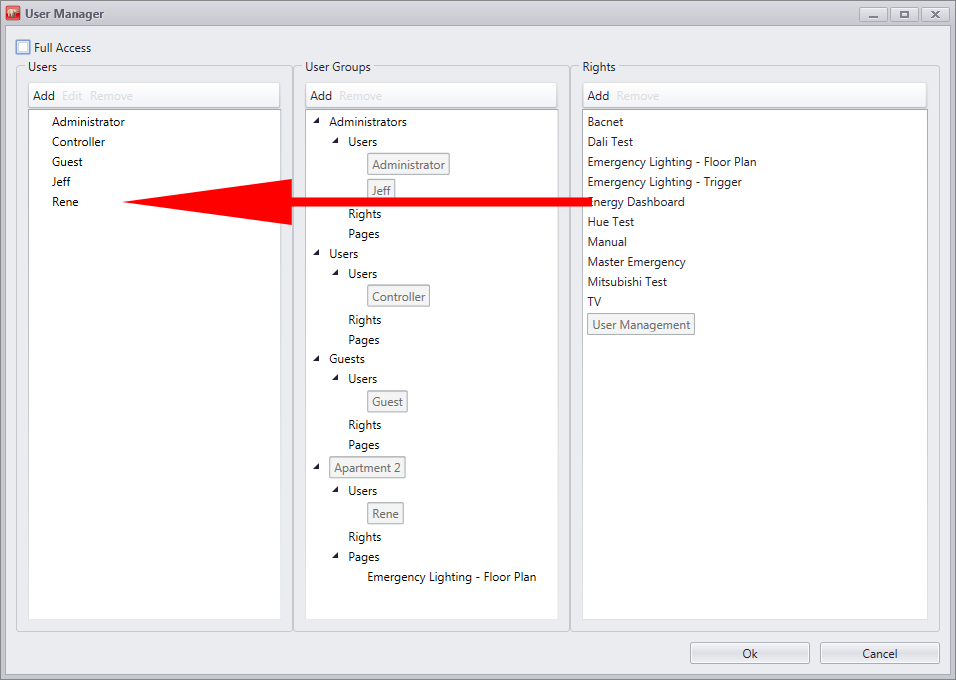
With drag & drop you can assign a different Start page for every user.
Following is visible to which user which home page is assigned.
The desired user must be set in the settings in the clients. The home page associated with the user is then displayed when the clients are started.
In addition, user switching can be performed with the user switching component.
Additional rights can be set individually for each component. For this, there is the rights property for every visible component. see chapter Component specific rights.