The DALI Emergency Light Graphical Display is a Visible Client component. It is used to display and operate a luminaire of the DALI emergency lighting manager. The display is an icon, depending on the type of light. Pressing opens or closes the display and operating popup. The automatic closing of the popup can be activated via the propertiesn. (see below)
To use the DALI Emergency Light Graphical Display, it must be connected to a Dali Emergency Light Channel on the DALI Emergency Light Manager. For this, a channel must be created in the DALI Emergency Light Manager. It is possible to connect several displays to the data point of an emergency light. The display and operation then takes place in parallel.
Data points of the component
Name |
Type |
function |
DALI Notlicht Channel |
Bidirectional |
Connection between a luminaire of the DALI Emergency Light Manager and the graphic display. |
Lock operation (display only) |
Input |
If this input is not used, the component can basically be operated. If the input is connected with an on signal, the component can not be operated. It then only has display function. |
Mouseover |
Output |
This output can be used to start an event when the object is moved by mouseover. |
Visible |
Input |
With an off-signal the component unVisible and with an on-signal Visible is switched. |
Input |
Properties
Name |
Standard |
function |
|---|---|---|
Close popup automatically [s] |
0 |
Time after the pop-up opens automatically. If the default value 0 is set, the popup must always be closed by pressing the icon. |
Display and operating popup
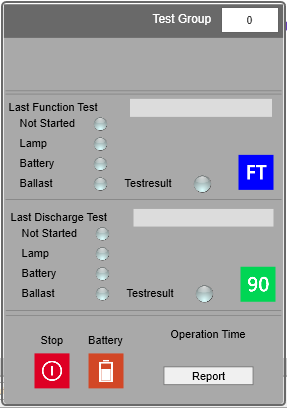
1. display block
The upper part of the component displays the alphanumeric data of the luminaire.
The test group to which the luminaire is assigned is displayed at the top right. The test group can be adjusted here by the user. Only groups that have been defined in the DALI Emergency Lighting Manager are available for selection.
2. display block
The test result of the last function test is displayed here.
Date and time indicate the end of the test.
The LEDs indicate the good status of the respective detail in green and the bad status in red.
A function test can be triggered manually with the blue key FT.
3. display block
The test result of the last endurance test is displayed here.
Date and time indicate the end of the test.
The LEDs indicate the good status of the respective detail in green and the bad status in red.
A duration test/discharge test can be triggered manually with the green key 90.
4. display block
With the red key IO all running tests can be stopped.
The organic Batt. key can be used to manually trigger a battery charge status query.
Here the operating time of the lamp is displayed in hours (calculated by the EisBaer).
The Report key triggers the output of all test results as an E-Mai for the luminaire.