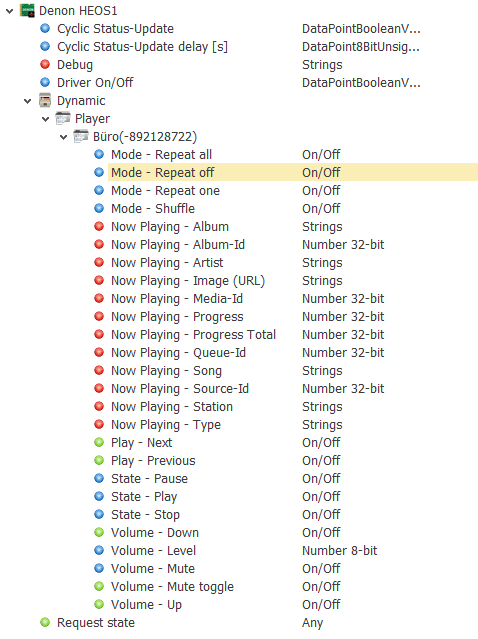
Data points of the component
Name |
Type |
function |
|---|---|---|
Debug |
Output |
The diagnostic information is displayed there, linked to the [Signal] input of the log window. |
Dynamic |
Folder |
Folder Dynamic displays the outputs for the available lights. Depending on the type and luminaire, the channels below are provided. |
Request state |
Input |
An arbitrary signal at this input triggers a query of the data. Each additional signal triggers another query. |
Driver On/Off |
Bidirectional |
Driver on or off. |
Cyclic Status-Update |
Bidirectional |
(De-) Activate the cyclic status update |
Cyclic Status-Update delay [s] |
Bidirectional |
Status update delay / interval in [s]. |
Properties
Name |
Standard |
function |
|---|---|---|
Device IP |
|
IP address of the HEOS device |
Port |
1255 |
The default telnet port is 1255 |
Player |
0 |
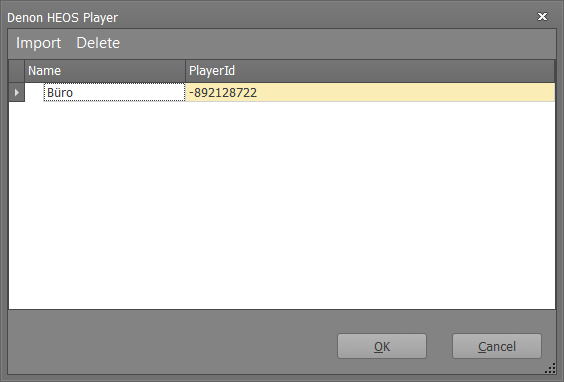
Opens the editor to import the players. The HEOS device can also offer access to other players as a "master" |
Groups |
0 |
Opens the editor for importing groups (if HEOS groups have been created) |
Timeout [s] |
5 |
Communication timeout in [s]. |
Cyclic Status-Update |
gesetzt |
(De-) Activate the cyclic status update |
Cyclic Status-Update delay [s] |
5 |
Status update delay / interval in [s]. |
Driver On/Off |
|
This can be used to set whether the component should be active when the system is started. |
To import a player, the following window appears:
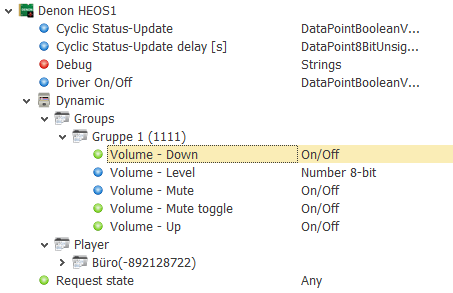
At the group level, there are only SPs for group-based volume control.
For each player there are SPs for displaying and changing the play mode (repeat all, repeat one, repeat off as well as shuffle.
Furthermore, the status (Play, Pause, Stop) can be displayed / changed. Via "Play - Next" and "Play - Previous" the next / previous track can be played.
The volume can be influenced by different SPs. A direct bet on a value (0-100) is possible as well as the increase / decrease by a certain amount.
As a value over the SP - is triggered without a valid amount, 1 is used as a step size. In addition, the output can be directly (de) activated via the SP Mute. The output can be activated (de) alternately via toggle mute.
Various information about the currently playing piece of music is output via the "Now Playing" SPs.