Oracle FIAS (Fidelio Interface Application Specification) is a protocol specification that is used by various PMS systems in the hospitality industry for data exchange.
If this component is created, it counts as 3000 components.
The basis is the XML Interface V1.1.0 for Fidelio 8.7.x.
Data points of the component
Name |
Type |
function |
|---|---|---|
Update Datapoints at startup |
Bidirectional |
If this option is set, all information about the created rooms will be requested by the PMS system at startup. If not, the last status of the last execution is considered current, and only future messages will affect the status. |
Debug |
Output |
The diagnostic information is displayed there, linked to the [Signal] input of the log window. |
Resync |
Input |
Re-sync the driver |
Driver On/Off |
Bidirectional |
Driver on or off. |
Connection State |
Output |
Indicates if the component is connected to the PMS. |
Characteristics
name |
Standard |
Function |
|---|---|---|
Rooms |
0 |
Rooms require a unique room number, a room name and a maximum permitted number of guests. The rooms available in the PMS should be imported (XML file) or created here. |
Server IP |
|
IP address of the Fidelio server. The IP address of the Fidelio server via which the PMS system can be reached is entered here. You can obtain this address from the administrator of the respective system. |
Server Port |
5000 |
Port of the Fidelio server. You can obtain the port from the administrator of the respective system. |
Message coding (code page) |
850 |
Enter the code page to be used here (e.g. 850) or the corresponding name (e.g. ibm850). |
Metadata in message text |
|
Determines whether notifications to guests are displayed with the date of receipt and recipient name, or whether only the text of the message appears. |
Class-Of-Service data points |
|
Class-Of-Service is a room property that traditionally consists of an enum of four values: 0: Barred 1: Local 2: National 3: No Restrictions |
Default language |
English |
Setting the language. |
Set data points at start |
|
If this option is set, all information about the rooms created is requested by the PMS system at startup. If not, the last status of the last execution is considered current and only future messages have an influence on the status. |
Time check-in |
12 |
Hour of the day when the check-in should take place. |
Time check-out |
12 |
Hour of the day when the check-out should take place. |
Driver On/Off |
x |
Switch driver on or off. |
Rooms
Opens the editor for creating / importing rooms into the Fidelio component.
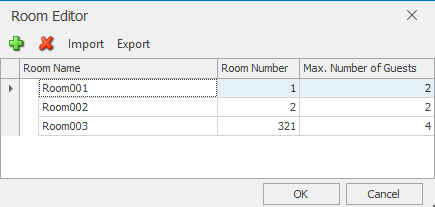
Rooms require a unique room number, a room name and a maximum permitted number of guests. The rooms available in the PMS should be imported or created here.
Virtual rooms and room combinations: Opera allows you to create virtual rooms (409CR ...) and combine rooms to create special units such as Combination Rooms (409CR..)
Opera room data: On the Opera side, rooms are identified by room names and line numbers. These line numbers serve as unique identifiers in the FIAS interface.
FIAS interface: The FIAS interface transfers the room numbers (line numbers) as identifiers, but they must not contain letters but only numbers.
Adaptation of the room numbers: On the Opera side, the line numbers must be adjusted accordingly to ensure that they meet the requirements of the FIAS interface. e.g. for 409CR - 1409.
When checking in, all rooms belonging to this "virtual room" will still be checked in, but at the same time room 409CR will also be checked in, which can then be used as a logical link on the EisBaer side in order to be able to group the rooms together for control purposes.
In the Class of Service Editor, you can freely configure which events should occur when the Class Of Service is notified by configuring the values when a corresponding Class Of Service is received.
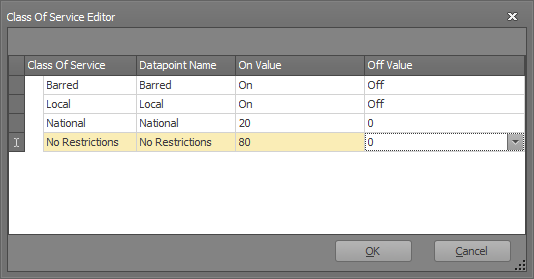
In the above case, if 0 (Barred) is received on the corresponding SP of the room, a Boolean On would be sent, and if another Class Of Service is set, an Off would be sent. Accordingly, the SP "National" belonging to the room would send the unsigned value 20 when the Class Of Service is set to 2 (National), or 0 if another Class Of Service is set.
Shared Properties
The shared properties (SP) can be used to connect the component to other polar bear components (displays, buttons, other bus systems, etc.).
The basic structure of the SPs can be seen in Figure 1.
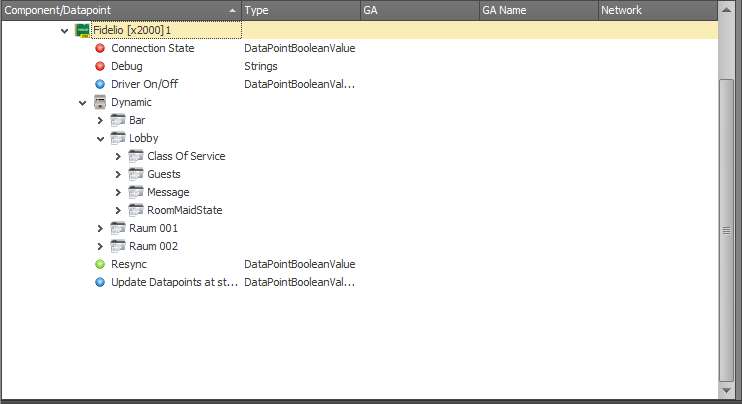
Dynamic
Below Dynamic, the individual rooms created / imported in the Room Editor are listed. Each room in turn has its own shared properties, which are explained below.
Class of Service
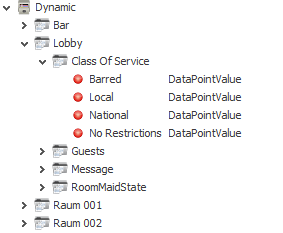
Class of Service contains the four SPs that have been configured in the Class Of Service Editor. If e.g. for the room "Lobby" Class of Service set to "National", the value 20 is sent on the SP National.
Guests
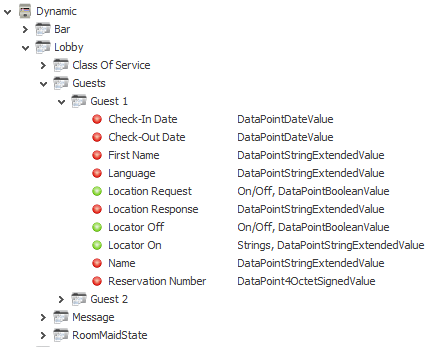
The guests are created under Guests. The number of guests available per room depends on the number of rooms per Room Editor. If it is a room-based system, one guest per room is sufficient, but then only one (main) guest can send messages, and only one person can be located.
•The existing SPs per guest are:
•Check-In Date: Check-in Date
•Check-out date: Check-out date
•First Name: First name of the guest
•-Language: language of the guest. Can be used to change the polar bear client language.
•Location Request: A request for the whereabouts of this guest can be executed. If an up-to-date information is available in the PMS, it will be displayed.
•Location Response: This is the SP where the guest's location is displayed when a request is triggered.
•Locator Off: With Locator Off, information about the location of the guest in the PMS can be deleted.
•Locator On: By setting a string to this SP, the PMS is informed that the guest is at the location that was sent to that SP. e.g. By sending "in the room" to this SP in the PMS the string "in the room" is stored in the field of the guest's location.
•Name: Last name of the guest
•Reservation Number: This is a unique ID of the guest shared by the PMS.
Message
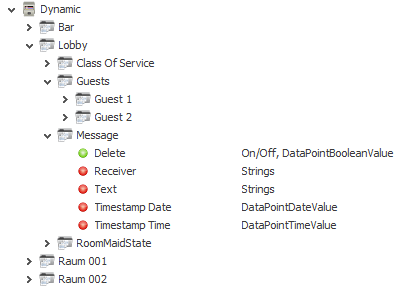
The EisBaer Fidelio component supports receiving messages from the PMS. Each room has a display for messages listed in chronological order. As soon as a message is acknowledged, the next message is displayed.
•Delete: If pressed, the currently displayed message is acknowledged and the next one displayed, if there are more.
•Receiver: recipient of the message
•Text: text of the message
•Timestamp Date: Date of receipt
•Timestamp Time: time of reception
RoomMaidState
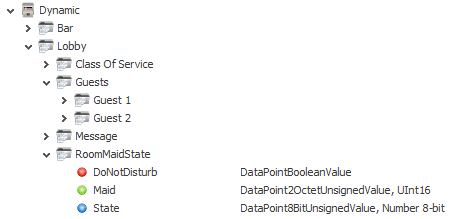
Under RoomMaidState the state of the room can be set / viewed.
The Maid State "State" is a standardized enum. The possible values and their meaning are:
1: Dirty/Vacant
2: Dirty/Occupied
3: Clean/Vacant
4: Clean/Occupied
5: Inspected/Vacant
6: Inspected/Occupied
•DoNotDisturb: Indicates whether the Do not Disturb flag is set in the PMS
•Maid: Maid is an optional ID that can be specified when setting the room condition. This can for example identify who has cleaned / inspected the room.
•State: This displays the current state of the room according to the enum. By offering the guest the option to set the state to dirty / occupied, a make Uo room function can be realized.