The Communication window is used to link the individual components with data points, e.g. from the KNX driver.
If data points are connected, networks are created. In principle, these networks are like group addresses in the ETS. However, they cannot be named and are created automatically by linking.
In the left part you can see the data points of the current selection, in the right part, for example, the data points of a component on another page can be displayed. This makes it possible to link across pages. To do this, open the pull-down menu via the arrow button and open the corresponding page.
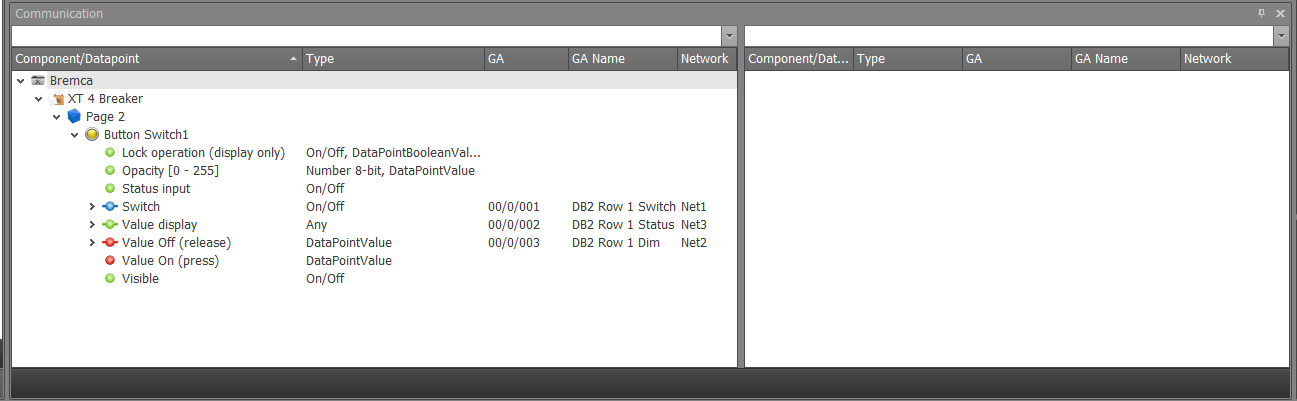
A short description is available for each data point as well as the respective data point type. If a link is present, the internal network name, the KNX group address and the KNX group address name are displayed. The arrow in front of a data point can be used to show or hide all linked components.
The colour coding is used to distinguish whether it is an input, output or bidirectional data point. Linked components are displayed with a bar in the data point.
|
Input ( Receiver only, no sender) |
|
In-/ Output (Bidirectional, sending and receiving |
|
Output (Sender only, no receiver) |
|
linked component (project name. page name. component name. data point name). Double-click or right-click --> "Select linked component" to switch to the component page. |




With remove or a right mouse click on the data point, the network can be disconnected from a data point.
Double-click or right-click (select linked component) on the data point of a linked component (black) to switch to the component page.