With this driver it is possible to access the LOXONE Smart Home systems (Miniserver Gen. 1 and 2).
Note: Remote Connect must not be active
Data points of the component
Name |
Type |
function |
|---|---|---|
Debug |
Output |
Error texts are output here. These may e.g. with the "Log window" component. Attention: Diagnosis or debug outputs are only intended for the case of an error. Please use only after consultation with the support team! These may significantly affect the performance of the service when used |
Debug Text Messages |
Output |
All received text message events are output here. These may e.g. with the "Log window" component. Attention: Diagnosis or debug outputs are only intended for the case of an error. Please use only after consultation with the support team! These may significantly affect the performance of the service when used |
Debug Text State |
Output |
All received text state events are output here. These may e.g. with the "Log window" component. Attention: Diagnosis or debug outputs are only intended for the case of an error. Please use only after consultation with the support team! These may significantly affect the performance of the service when used |
Debug Value State |
Output |
All received value status events are output here. These may e.g. with the "Log window" component. Attention: Diagnosis or debug outputs are only intended for the case of an error. Please use only after consultation with the support team! These may significantly affect the performance of the service when used |
Dynamic |
Folder |
see below |
Driver On/Off |
Bidirectional |
(DE) Activate the component |
Connection state |
Output |
Returns the current connection status to the Loxone system as on / off. |
Verbose Debug |
Input |
(DE) Enables extended debug output |
Properties
Name |
Standard |
function |
|---|---|---|
Connection |
|
The settings for communication are made here. The URL of the server, the communication port (e.g. 80 without TLS, 443 with TLS) and the user data (e.g. admin/admin) must be entered. Furthermore, a communication timeout can be defined and a device UUID (for the EisBaer client) can be generated. |
Devices |
0 |
In the device dialog, the devices are imported from the specified Loxone system and displayed, including the device hierarchy. |
Driver On/Off |
|
(DE) Activate the component |
Dynamic Folder:
Below the folder "Dynamic", the data points are created to control the existing devices. Here, the device hierarchy is taken into account, with the top level mapping the rooms. Below the rooms there are two data points, which again reflect the room name and the type. There is also a subfolder with the "Categories" available in this room. The data points of the devices belonging to the various categories are very different and are listed here by way of example for a "Lighting Controller". The structure of the data points is analogous for the other types. For details refer to the Loxone documentation. In the link "Structure File" under https://www.loxone.com/dede/kb/api/ there is a PDF that describes all controls with their properties. These are shown 1: 1 in the EisBaer.
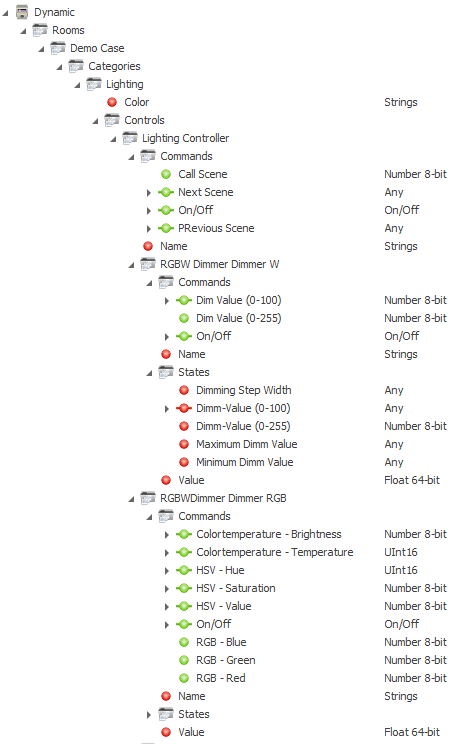
Below the "Lighting" category is the "Controls" folder. This folder contains all controls of the "Lighting" category that are assigned to the room (in this case, the "Lighting Controller" control).
Each control has the subfolders "States" and "Commands" (if available) as well as further subfolders for any associated "Subcontrols" (in this case "Colour"), which in turn are structured analogously.
The "Commands" folder contains data points to perform control-specific actions (e.g. setting a lighting scene).
The "States" folder contains data points that reflect the various control-specific states (in this case, for example, the current lighting mood).