This invisible component is used for daylight simulation. This can also be used to set the corresponding color temperature for the course of the day.
Data points of the component
Name |
Type |
Function |
Active Time [min] |
Bidirectional |
In "Free Period Selection" mode, the set active time is output here or can be adjusted here during runtime. |
Current Position [s] |
Bidirectional |
Above this, in "Free period selection" mode, the output of the current simulation position within the period is displayed in seconds. Furthermore, the position can also be set manually to jump to a certain position within the period and continue from there. |
Current State |
Output |
Output of the simulation status (0 = STOP, 1 = RUN, 2 = PAUSE) |
Presence |
Input |
Via this data point, the component can be informed whether persons are present. If the presence evaluation is active, the outputs will be deactivated in case of absence (light switched off). |
Use presence input |
Bidirectional |
This is used to output / set whether the presence is evaluated or not. |
Debug [Text] |
Output |
Attention: Diagnostics or debug outputs are only intended for the case of an error. Please use only after consultation with the support team! These may significantly affect the performance of the service when used. |
Dimm Value (higher color temperature, linear) |
Output |
Output of the linear dimming value for the luminaire with the higher color temperature |
Dimm Value (higher color temperature, linear) [0-255] |
Output |
Output of the linear dimming value for the luminaire with the higher color temperature in a range of 0-255. |
Dimm Value (higher color temperature, logarithmic) |
Output |
Output of the logarithmic (DALI standard) dimming value for the luminaire with the higher color temperature |
Dimm Value (higher color temperature, logarithmic) [0-255] |
Output |
Output of the logarithmic (DALI standard) dimming value for the luminaire with the higher color temperature in a range of 0-255. |
Dimm Value (lower color temperature, linear) |
Output |
Output of the linear dimming value for the lamp with the lower color temperature |
Dimm Value (lower color temperature, linear) [0-255] |
Output |
Output of the linear dimming value for the lamp with the lower color temperature in a range of 0-255. |
Dimm Value (lower color temperature, logarithmic) |
Output |
Output of the logarithmic (DALI standard) dimming value for the luminaire with the lower color temperature |
Dimm Value (lower color temperature, logarithmic) [0-255] |
Output |
Output of the logarithmic (DALI standard) dimming value for the luminaire with the lower color temperature in a range of 0-255. |
End time (24h mode) |
Bidirectional |
Dynamic entry of the end time for the 24 hour mode. This represents the sunset and can be taken over by the astro timer. |
Endless |
Bidirectional |
Data point for displaying / setting the endless repeat. |
color temperature [K] |
Output |
Currently calculated color temperature |
Manual color temperature [K] |
Bidirectional |
Value of the color temperature, which is set, if over the data point "Manual" a true is received (causes a temporary overwriting of the computed color temperature). |
Manual brightness [%] |
Bidirectional |
Value of the brightness that is set when a true is received via the "Hand value" data point (causes a temporary overwriting of the calculated brightness). |
Manual brightness [0-255] |
Bidirectional |
Value of the brightness that is set when a true is received via the "Manual value" data point (causes the calculated brightness to be temporarily overwritten). |
Set Manual Value |
Bidirectional |
Input to call the defined manual value manually (true) or delete it (false -> return to the current or last simulation value) |
brightness (calculated) |
Output |
Calculated brightness value as a comma value |
brightness (compensated) |
Output |
Brightness, compensated for current brightness with constant light control in% |
brightness (regulated) |
Output |
Calculated brightness (incorporation of the lumen package and the correction factor), compensated for the current brightness with constant light control |
brightness [%] |
Output |
Returns the current brightness in %. |
brightness [0-255] |
Output |
Returns the current brightness in a range of 0-255. |
Within active range |
Output |
Here you can see if the simulation is currently in the "active range of the curve" or not. |
Constant Light Regulation |
Bidirectional |
This can be used to set whether the currently measured ambient light should be taken into account when calculating the dimmer values. |
Meassured Light |
Input |
Input of measured light for constant light control |
Lux Correction |
Bidirectional |
This factor is taken into account when calculating the value "brightness calculated". |
Pause |
Input |
Pause the output. When the pause is finished, the values are reissued according to the pause mode setting. |
Period [min] |
Bidirectional |
Writing / reading the periods duration, in the "free period selection" mode in minutes. |
Reset |
Input |
Resets the calculation to the beginning of the period |
Setpoint of the external constant light control |
Input |
The type of curve can be changed at runtime |
Start |
Input |
Starts the output |
Start time (24h mode) |
Bidirectional |
Dynamic entry of the start time for the 24 hour mode. This represents the sunrise and can be taken over by the astro timer. |
Stop |
Input |
Stops the output |
Driver On/Off |
Bidirectional |
Driver on or off. |
Type |
Bidirectional |
Data point for displaying / setting the progression type (0 = daylight, 1 = activate) |
Properties
Name |
Standard |
Function |
|---|---|---|
Mode |
FreePeriod... |
Setting for 24h mode or own period time, as well as endless repetition |
Max colour temperature [K] |
6500 |
Maximum value of the colour temperature in Kelvin for light source 1 (mixture with light source 2) |
Min colour temperature [K] |
3000 |
Minimum value of the colour temperature in Kelvin for light source 2 (mixture with light source 1) |
Max brightness [%] |
100 |
Maximum brightness in per cent |
Min brightness [%] |
40 |
Minimum brightness in per cent |
Manual value Colour temperature [K] |
4000 |
Manually set value of the colour temperature in Kelvin. This value is assumed if a true is received at the manual value data point. |
Manual value brightness [%] |
100 |
Manually set brightness value in per cent. This value is assumed if a true is received at the Manual value data point. |
Type |
Daylight curve |
Type of colour temperature/brightness curve. There are currently 3 profiles available: Daylight curve, Activate curve and Manual curve (see below). |
Manual curve |
|
This option can be used to set your own curves for colour temperature and brightness. |
Update interval [s] |
30 |
Setting the intervals for updating the calculated colour temperature/brightness values. |
Pause mode |
Hold position |
This can be used to set whether the simulation of the curve progressions should be continued or paused in the background during a pause (or during overwriting using a manual value). |
Constant light control |
|
This can be used to set whether the currently measured ambient light should be taken into account when calculating the dimming values. The current brightness of the curve is offset against the brightness actually measured by the sensor. The calculated value is output at the "Brightness (regulated)" data point. |
External constant light control |
|
If activated, the dimming values at the outputs are compensated according to the setpoint value of the external control. |
Lumen package |
1 |
The maximum brightness of the lamps used can be entered here. This value is multiplied by the calculated target brightness (in %) and the correction factor and output on the data point (brightness calculated). |
Light correction factor |
1 |
This factor is taken into account when calculating the "Brightness calculated" value. |
Evaluate presence |
|
If this option is set, presence evaluation is active |
Upper threshold value for 0% hysteresis |
5 |
If the brightness was at 0%, it must rise above this value before it is output again. |
Autostart |
|
This can be used to set whether the sequence should start automatically when the component is active. |
Driver on/off |
|
This can be used to set whether the component should be active when the system is started. |
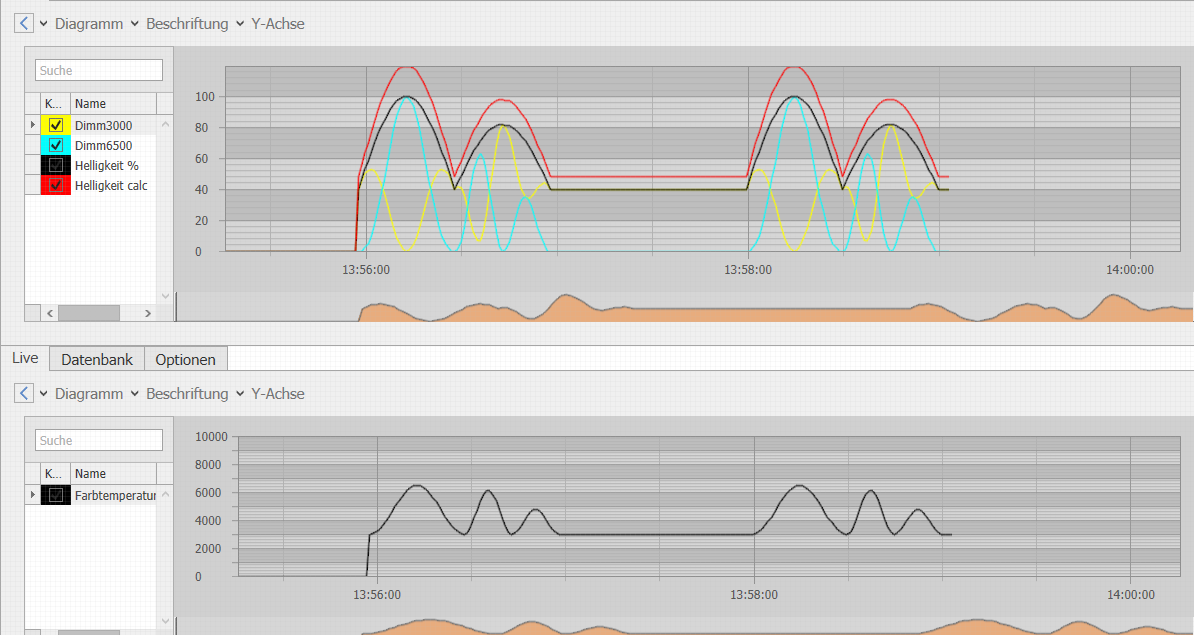
Below are the progressions of the brightness and color temperature of the two modes. The following values are set:
Color temperature = 3000K - 6500K;
Brightness = 40% - 100%;
Period: 2 minutes;
Active time: 1 minute;
Repeat: Active
Course of the brightness in the mode "daylight" (runs within the defined "active time" between color temperature min and color temperature max):

Color temperature trend in "daylight" mode (runs within the defined "active time" between color temperature min and color temperature max):

Color temperature trend in "Activate" mode (runs within the defined "Active time" between color temperature min and color temperature max):
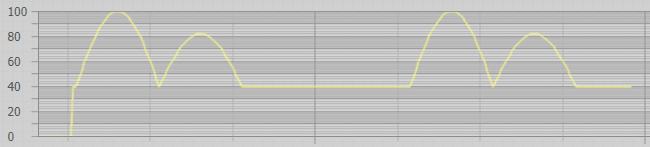
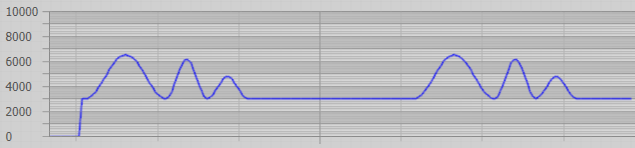
Example:
Time lapse with a period of 2 minutes and an active time of 1 minute (continuous repetition), Type: Activate.