Modbus TCP / UDP communication requires the establishment of a TCP / UDP connection between a client (eg: PC with EisBaer SCADA) and the server (e.g., EisBaer TCP / UDP - Modbus-MBUS Gateway). For communication, the Modbus reserved TCP / UDP port 502 is usually used.
As a Modbus master (Modbus TCP / UDP client), the EisBaer can retrieve the data of the Modbus devices via a network connection. The remote station is referred to as a Modbus TCP / UDP slave (Modbus TCP / UDP server).
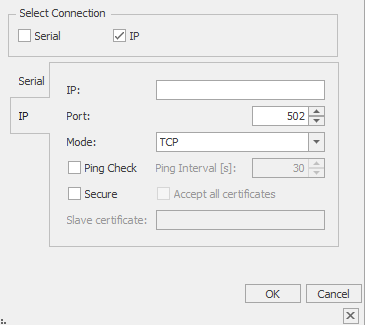
IP: The IP address of the Modbus device is entered in this field.
Port: The port can be set here for communication with the Modbus device.
Mode:
TCP: Modbus / TCP is very similar to RTU, but TCP / IP packets are used to transmit the data. TCP port 502 is reserved for Modbus / TCP.
MBAP (Modbus Application Header) is the "normal" Modbus TCP specification. MBAP has no CRC check value, whereas Modbus RTU contains a CRC check value over TCP / IP.
RTU over TCP: Modbus RTU (RTU: Remote Terminal Unit) transmits the data in binary form. This ensures good data throughput, however, the data can not be evaluated directly by humans, but must first be converted into a readable format. In the "RTU over TCP" variant, the RTU telegrams are packed and sent in TCP packets. Modbus RTU over TCP / IP is typically used by serial servers that implement Modbus Ethernet client communication with multiple Modbus RTU RS485 slaves via a serial server. The serial server removes the Ethernet sections and forwards the Modbus RTU message to the serial port or serial ports.
ASCII over TCP: In Modbus ASCII, no binary sequence, but ASCII code is transmitted. As a result, it is directly human readable, but data throughput is lower compared to RTU. In the "ASCII over TCP" variant, the ASCII telegrams are packed and sent in TCP packets.
UDP IP: This mode behaves like the TCP mode, but the UDP packets sent are not controlled. This allows faster communication with a UDP connection.
Ping Check: This option performs a cyclic ping check at the set interval.
Secure: Setting for Modbus devices that support an encrypted network connection. Either all certificates can be accepted or slave-specific certificates can be loaded. For user-defined certificates, the complete storage path of the .cer file must be entered.
Serial
Modbus can be used to connect a master (eg a PC) and several slaves (eg measuring and control systems). Each bus user must have a unique address. The address 0 is reserved for a broadcast. Each participant is allowed to send messages via the bus. Usually, however, this is initiated by the master and an addressed slave responds. For the correct driver setting, the operating instructions of the terminal must be observed.
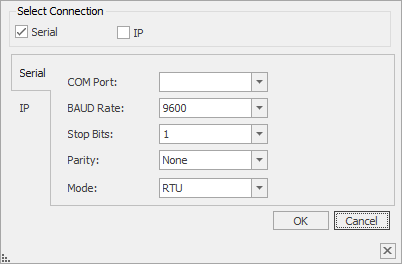
COM port: Selection of the communication port.
Baud rate: Specifies the transmission speed.
Stop bits: select the number of stop bits (1 or 2)
Parity: setting parity (without / even / odd)
ASCII mode
In Modbus ASCII, no binary sequence, but ASCII code is transmitted. As a result, it is directly human readable, but data throughput is lower compared to RTU.
RTU mode
Modbus RTU (RTU: Remote Terminal Unit) transmits the data in binary form. This ensures good data throughput, however, the data can not be evaluated directly by humans, but must first be converted into a readable format.