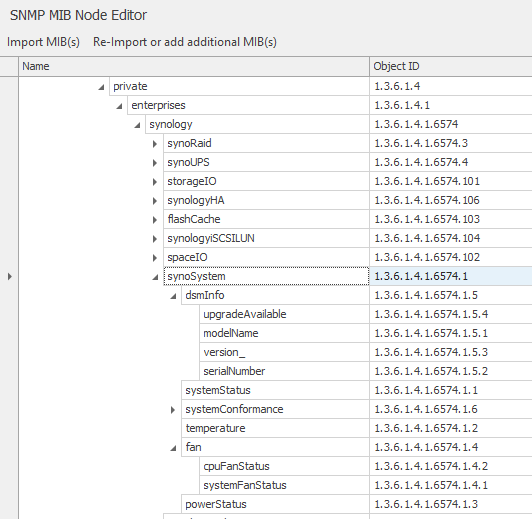
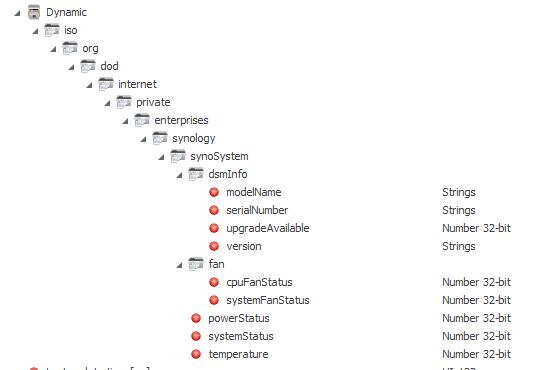
The SNMP Manager allows you to query any number of data points of an SNMP agent - these can be routers, switches and firewalls as well as servers, IP cameras, NAS systems, printers and computers.
Using the channel editor of the SNMP manager, the required Management Information Base (MIB) is usually compiled with the standard MIB, as well as additional extensions and manufacturer-specific objects of the agent - a database of the network element.
Hint: When using this component, 200 components are charged per SNMP manager.
Features
The basic settings are stored in the editor via the properties.
Name |
Basic setting |
Function |
|---|---|---|
Channels |
0 |
Using the channel editor, MIB files of agents can be imported as well as dependent MIB files - either completely new or successively by importing further MIB files. After each successful import, the OID directory is rebuilt and can also be sorted by the respective columns. The object IDs to be queried must be selected in the "Queries" column, from which dynamic communication objects are then generated. The table entries (number of objects) can be increased or decreased to the required number (e.g. number of hard disks in a NAS). |
Agent IP |
|
IP address of the SNMP agent to be queried via the previously selected channels. The Agent's specific MIB files should have been imported previously. |
Agent Port |
161 |
Port of the agent to be queried. |
SNMP version |
one |
Opens the editor for setting the SNMP version. If V3 is used, the authentication and encryption passwords and the associated protocols can be specified. |
SNMP Read Community |
public |
Access rights of the named community for read-only access (usually "public") |
SNMP write community |
private |
Access rights of the mentioned community for read and write access (mostly "private") |
Cyclic updating |
Active |
This can be used to set whether the cyclical scanning of the selected objects should be activated at project start. |
Update pause [s] |
60 |
Pause between updates in seconds |
Sequential updating |
Inactive |
Defines whether the objects should be updated in parallel or sequentially. |
Retries |
1 |
Retries of the channels to be queried within the tables |
Timeout [ms] |
1000 |
Adjustable timeout for establishing a connection to the agent |
Timeout [tables] [ms] |
1000 |
Adjustable timeout for internal table query of OIDs |
Query linked channels only |
Active |
If the selection is active, only linked or used communications objects (KOs) are queried, otherwise all objects in the table |
Old implementation |
|
With this option, processing is realised via a newer or older API. |
Index of the first table entry |
1 |
Setting for the first entry in a table. Possible values are 0 and 1. |
Driver On/Off |
Active |
Start behaviour of the component at simulation start or EisBaer server start |
Channels
MIB files can be loaded here. With "Import MIB" one or more MIB files can be selected and imported. Please note that all dependencies must be resolved by the files - if a dependency is not fulfilled by another MIB file, the importer will name the missing MIB file. It is also possible to import several MIB files one after the other by using the button "Re-Import or add more MIB(s)".
In the column "Table entries" you can specify for tables for how many rows (number of objects) the corresponding data points should be created. In the "Queries" column, you can select the objects that are to be queried cyclically and communication objects created for linking.
Data points
Name |
Type |
Function |
|---|---|---|
Update |
Input |
A manual query can be initiated here. |
Updating is carried out |
Output |
Status output, whether the update is currently active/inactive |
debug [Text] |
Output |
Error messages are output here. Attention: Diagnosis or debug outputs are only provided for the case of errors. Please only use them after consulting the support team! If used, these can considerably impair the performance of the service. |
Verbose debug |
Input |
Turns advanced diagnostics on or off. |
Last update time [s] |
Output |
Duration in seconds of the last update. |
Next update [s] |
Output |
Time in seconds until the next query in the form of a countdown . |
Driver On/Off |
Bidirectional |
Driver On or Off or status output whether driver is switched on or off. |
Connection status |
Output |
Status output of the connection status. However, a ping to the agent is not sent here, but rather an active check is made for accessible data points. |
Cyclical update |
Bidirectional |
Here the cyclic update can be (de)activated during runtime or used as status output. |
Dynamic |
Folder |
Contains the data points of the selected ObjectIDs (OIDs) from the channel editor. |
- OID name |
Output |
Here the corresponding outputs are to be found for every defined activated data point. Here the whole hierarchy is shown as shown in the MIB and in the editor. An easier linking is made possible by the "Driver Data Points" window. The filter function allows a very fast search for objects by OID number or OID name. |