The Simple Network Management Protocol (SNMPSimple Network Management Protocol ;) is a network protocol that the IETF Designed to network elements (e.g. Routers, servers, switches, printers, computers etc.) from a central station monitoring and control. The protocol controls the communication between the monitored devices and the monitoring station. SNMP describes the structure of the data packets that can be sent, and the communication process. It has been designed in such a way that each network enabled device with included in the monitoring. The tasks of the network management, which are possible with SNMP include:
• Monitoring of power plant components,
• Remote control and configuration of network components,
• Error detection and error notification.
Due to its simplicity, modularity and versatility has developed SNMP to standard, both from most management programs as well as of end devices is supported.
Available Drivers:
Mode of operation
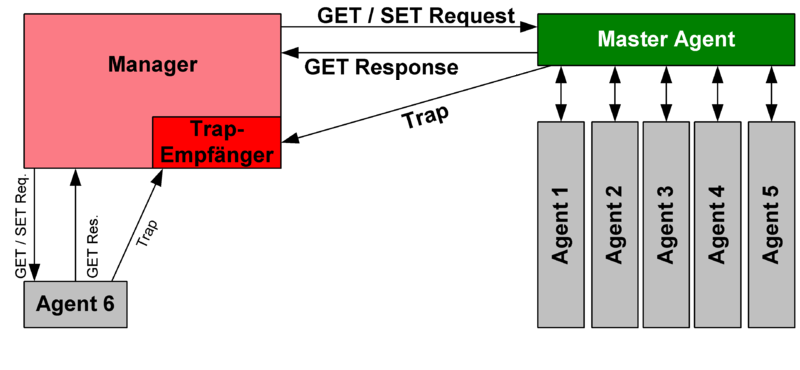
For monitoring, so-called agents are used. These are programs that run directly on the Monitored Devices, or hardware, the same tasks fulfilled.[1] These programs/devices are able to capture the state of the network device and also self-settings or trigger actions. With the help of SNMP, it is possible that the central management station can communicate with the agent via a network. There are six different data packets that can be sent to:
How SNMP works.
GET
To request a management record
GETNEXT
In order to retrieve the following data record (tables)
GETBULK
In order to retrieve several records at once, such as multiple rows of a table (available from SNMPv2)
SET
One or more records in a network element to change. Sometimes a network element the simultaneous change of multiple data sets, in order to verify the consistency. The configuration of an IP address, for example, requires the simultaneous display of the network mask.
RESPONSE
The answer to one of the previous packages.
TRAP
Unsolicited message from the agent to the manager that an event has occurred. Programs such as Wireshark, the decode of protocols such as SNMP used to call this data packet also report. A TRAP can also be sent in a set, if the package(s) described record change(s) could not be carried out(s), and not just a malfunction (for example, a defect of a module of a network element).
The three get-packages (GET, GETNEXT, GETBULK) can be sent to an agent by the manager to request data on the respective station. This responds with a response packet that contains either the requested data or an error message.
With the set-package a manager can change values at the agent. This makes it possible to trigger settings or actions. The agent confirms the transfer of values also with a response package.
If the agent is in the monitoring of the system detects an error, it with the help of a TRAP-package be returned to the management station. These packages are not confirmed by the manager. The agent can therefore not determine whether the sent trap-package the manager arrived.
So that the network load remains low, to send the message the connectionless UDP is used. The agent receives the requests (requests) on port 161, while for the manager of the port 162 to receive the TRAP messages is required.
Source: Wikipedia