






Eye Suite 26 — all Eye tools
at a glance.
Dashboard, launcher and combined monitor for KNXEye 26, ModEye26, MQTTEye 26, BACnetEye 26, OCPPEye 26, DALIEye 26 and the KNX IP-Scanner. Free.
The Eye Suite 26 shows all Eye tools with version and licence status, installs missing ones in one click and tells you when a new version is available. Running tools send their traffic to the combined monitor — all protocols on one timeline. Every tool still runs on its own as well.
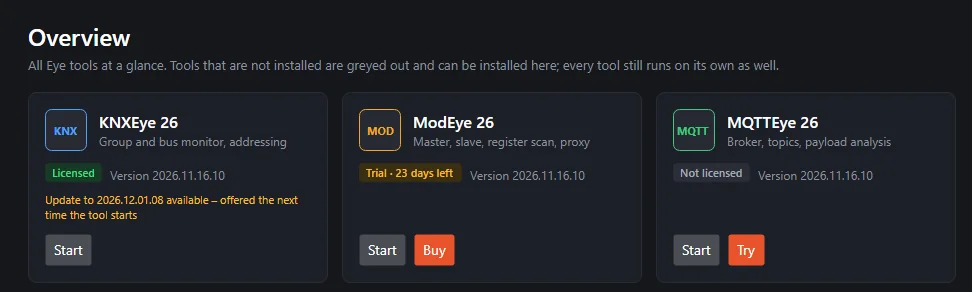
Part of the overview: version, licence status and a note about a newer version for each tool. (Image from the program, sample data.)
Launcher, licence overview and combined monitor
For everyone who works with several Eye tools — and for everyone who wants to get to know one.
All tools at a glance
Tiles with version, licence status and whether the tool is currently running. Tools that are not installed are greyed out; a green dot in the left bar marks a running tool.
Installation in one click
“Install” downloads the current version from the server to C:\Program Files\Alexander Maier GmbH\ and creates shortcuts. “Start” opens the tool as a separate program.
Licence status at a glance
Every tile shows whether a tool is licensed, on trial or expired; the top right shows how many tools are licensed. “Try” and “Buy” right on the tile.
Updates at a glance
The suite checks the tools' versions and shows on the tile when a newer one is available. The update is installed by the tool itself; the suite also updates itself.
Combined monitor
All running tools on one timeline — KNX, Modbus, MQTT, BACnet, OCPP and DALI. Filter per protocol, pause, clear; how many rows are kept is set in the settings.
Tools stay standalone
Every tool has its own licence, settings and updates and also runs without the suite. The traffic goes to the suite locally on the same computer only.
One tool per protocol — together in the suite
Every tool can be installed and started from the suite, but also downloaded on its own. More about each tool on its own page.
All protocols on one timeline
Running tools register with the suite automatically. Their traffic appears with time, protocol, kind, address or topic, meaning, value and channel — newest at the top.

Combined monitor with telegrams from OCPPEye, ModEye, MQTTEye and KNXEye. (Image from the program, sample data.)
In three steps
Download and start the suite
Download and start EyeSuite26.exe. On first start the suite offers to install itself to C:\Program Files\Alexander Maier GmbH\ — once, with administrator rights.
Install and start tools
Get missing tools with “Install”, open existing ones with “Start”. Request a trial licence or buy right on the tile.
Traffic in the combined monitor
Running tools register automatically; their traffic appears in the combined monitor. If you close the suite, the tools keep running.
Free for Windows
The suite is free. Every tool has its own licence; “Try” and “Buy” are on the tool's tile.
| Operating system | Windows, 64-bit |
| Installation | a single program file; the suite and the tools live together under C:\Program Files\Alexander Maier GmbH\ — the folder is prepared once with administrator rights, after that installations and updates run without asking again |
| Tools | MQTTEye 26, BACnetEye 26, OCPPEye 26 and DALIEye 26 from version 2026.11.16.13 report licence status and traffic to the suite |
| Internet | for installing the tools and for updates |
| Price | free |
Frequently asked questions
How much does the Eye Suite 26 cost?
Nothing. The suite itself is free. Every tool has its own licence; the suite also shows the free KNX IP-Scanner.
Do I need the suite to use an Eye tool?
No. Every tool remains a separate program and also works without the suite — with its own licence, its own settings and its own updates. The suite is launcher, licence overview and combined monitor; if you close it, the tools keep running.
Which tools does the suite show?
KNXEye 26, ModEye26, MQTTEye 26, BACnetEye 26, OCPPEye 26 and DALIEye 26 as well as the free KNX IP-Scanner. Tools that are not installed are greyed out and can be installed straight from the suite.
How do I install a tool?
“Install” on the tile downloads the current version of the tool from the server and places it in the installation folder. After that, “Start” launches the tool as a separate program. Each tool installs its own updates; the suite shows on the tile when a newer version is available.
Where is it installed?
The suite and the tools live together under “C:\Program Files\Alexander Maier GmbH\<product>\”. The folder is prepared once with administrator rights; after that, installing via the suite and all updates run without asking again. Shortcuts go on the desktop and into the Start menu under “Alexander Maier GmbH”.
How do the licences work?
Every tile shows the licence status the tool reported when it last started; the top right shows how many of the paid tools are licensed. “Try” requests a free trial licence, “Buy” opens the shop. The licence is activated in the tool itself. If it says “License unknown”, start the tool once.
What does the combined monitor show?
Running tools register with the suite automatically and send their traffic to the combined monitor — all protocols on one timeline, newest at the top, with time, protocol, kind, address or topic, meaning, value and channel. The coloured buttons hide individual protocols, “Pause” freezes the display, “Clear” empties it.
Does the data leave my computer?
No. The tools hand their traffic to the suite via a local connection on the same computer, only for the signed-in user. If no suite is running, this costs the tool nothing.
Which tool versions work with the suite?
MQTTEye 26, BACnetEye 26, OCPPEye 26 and DALIEye 26 from version 2026.11.16.13 report licence status and traffic to the suite. Older versions update themselves via their own update.
Is the suite available for Linux or macOS?
No, the Eye Suite 26 is available for Windows. The tools MQTTEye 26, BACnetEye 26, OCPPEye 26 and DALIEye 26 also run on Linux — there each on its own.
Which languages are available?
19 languages like the tools, plus light, dark or following Windows.
Another question? Write to us at info@busbaer.de.
All Eye tools in one place.
Download and start EyeSuite26.exe — and add the tools you need in one click.
Get in touch
Imprint
Alexander Maier GmbH
Beckstraße 3
D-69412 Eberbach
Managing director: Alexander Maier
Registered office: Eberbach
Register court: Mannheim
Commercial register: HRB 335404
VAT ID: DE177682654
Phone: +49 (0) 6271 – 91 94 70
E-Mail: info@busbaer.de