Instructions for setting up a 2N door intercom:
The camera/door intercom is configured via web access on the door intercom. The IP address is displayed in the 2N Network Scanner.
A SIP server is required as the connection between the door intercom and the EisBaer Video door intercom, e.g. our SIP server internal. The user data (name/password) of all clients used are defined in this.
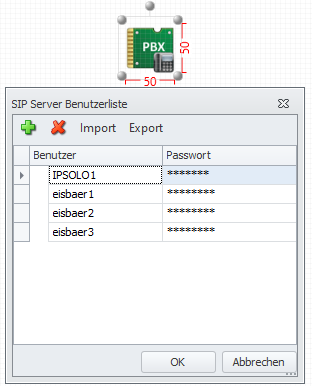
To test the intercom, start the simulation in the editor.
The paging station is configured in the web server of the paging station (IP of the doorphone)
e.g. https://192. 168.100.62/#services-phone-sip?tabindex=0
Services \ Phone
the SIP settings are made here.
SIP1
Identity of the intercom
Show name [2N IP Uni]
Phone number (ID) [IPSOLO1]
Domain [192.168.100.65] --> IP of the EisBaer-Server
With "Test call" the function can be tested. For this, the SIP server must be running and a client, e.g. the video door intercom, must be configured in the Polar Bear Editor.
Authentication
User authentication ID [X]
Authentication ID [IPSOLO1]
Password [IPSOLO1]
SIP Proxy
Proxy Address [192.168.100.65]
Proxy Port [5060]
Backup proxy address []
Backup proxy port []
SIP Registrar
Registration enabled [X]
Address Registrar [192.168.100.65]
Port Registrar [5060]
Address backup registrar []
Port Backup Registrar [5060]
Registration expires [120] [s]
Registration status REGISTERED / NOT REGISTERED
Cause of error - Details of the cause of the error are displayed.
Save with the disk symbol. The call station attempts to register with the SIP server after saving. The success is displayed in the Registration status field.
Calls
Under Incoming Calls in Answering Mode (SIP1) Set Automatic
Save
Directory \ Users
Create SIP clients (all remote stations in the polar bear) to be called.
Hardware \ Switch
Set the code to open the door e.g. 00
00* must then be entered in the polar bear.
Hardware \ Keys
Under speed dialling keys, use + to select the subscribers who are to be called by the call station, per key.
ATTENTION: For the direct tap of the video image the additional license "Extended Video License" is required.
Services \ Streaming
Activate RTSP Server
Set the parameters as desired. e.g. Video Codec H.264 and anonymous access.
The URL of the stream for access is displayed: rtsp://192.168.100.62:554/mjpeg_stream
To view in polar bear, use the "IP Camera and Media Display".
Save
Services \ ONVIF
Set name and password to access the camera if anonymous access is not desired.
e.g. eisbaer1 / eisbaer1
The URL of the stream is then: rtsp://eisbaer1:eisbaer1@192.168.100.62:554/h264_stream.
Use the "IP Camera and Media Display" to display in the polar bear.
Settings in the EisBear
Properties of the "Video door intercom" component
Name |
Standard |
Function |
|---|---|---|
Display name |
eisbaer1 |
Any name that is displayed at the remote terminal when a connection is established. |
User name |
eisbaer1 |
Name of the user in the server domain. Mostly identical to the registry name. |
Registration name |
eisbaer1 |
Name for registration at the proxy. |
Password |
eisbaer1 |
Password for registration at the proxy server (switchboard/exchange). |
Domain Server Host |
192.168.100.65 IP address of the SIP server |
Domain of the proxy, sometimes also called realm. In many cases, the IP address of the proxy is also entered here. |
Proxy IP |
192.168.100.65 IP address of the SIP server |
IP address of the proxy server (switchboard/exchange). |
Proxy Port |
5060 |
SIP port of the proxy server for registration. |
DTMF signal Open door |
00* |
DTMF signal tone sent to open the door. |
Registration required |
x |
If the check mark is set, the video door intercom must be registered with the proxy (telephone exchange/exchange) with name and password. |
DTMF signal light switching |
|
DTMF signal tone, which is sent to switch the light. |
Number/Name Intercom station |
IPSOLO1 |
Internal number or name of the call station on the proxy server (switchboard/exchange). |
IP camera URL/path to MJPG stream |
|
not possible because the call station uses RTSP. Use IP Camera and Media Display instead |
IP Camera Username |
|
not possible |
IP Camera Password |
|
not possible |
IP Camera frames per second (0-20) |
|
not possible |
Audio Codec: PCMU, PCMA
Video Codec: H.264, H.263plus, H.263
changeable under Services \ Phone \ Audio and Video
Status: 06/2021