With the help of the component, it is possible to integrate a display window for IP cameras and video streams.
The camera images are displayed scaled to the size of the component, with the aspect ratio unchanged. For this reason, the resolution of the stream should be adapted to the component size in EisBaer.
The URL must be entered in full and in the following example format:
http://<IP>/<Path>/xxxx.mjpg
If the camera is secured with login data, the Uri is written as follows:
http://<User>:<Password>@<IP>/<Path>
Depending on the camera, the port must also be specified:
http://<User>:<Password>@<IP>:<Port>/<Path>
Data points of the component
Component name |
Type |
Type Function |
|---|---|---|
File played |
Output |
Outputs an on signal when playback is finished. |
File name last snapshot |
Output |
Outputs the file name of the last snapshot |
Louder [+5] |
Input |
Increases the volume by 5% |
Volume [0-100] |
Input |
Sets the volume to the set value |
Quieter [-5] |
Input |
Reduces the volume by 5% |
Media source URL |
Input |
Sets the path of the media source to be displayed |
Media source URL (own window) |
Input |
Opens a window with the URL sent to the data point, also multiple times with different URLs. |
Media source URL Output |
Output |
Outputs the path of the media source which was sent as a URL to the "Media source URL" data point. (Does not work if the URL from the list was used). Click on the component to output the URL at this data point again. |
Pause |
Input |
The stream is paused with an ON signal. Playback is resumed via "Start". |
Visible |
Input |
The component is switched invisible with an OFF signal and visible with an ON signal. |
Trigger snapshot* |
Input |
Triggers a snapshot with an ON command |
Start |
Input |
With an ON edge Starts / Continues the display |
Stop input |
Input |
Stops the display when ON or OFF |
Open stream in separate window |
Input |
The current stream is played back in a new display window via an ON signal. |
Sound On/Off |
Input |
Switches the sound on and off |
Input |
||
Repeat |
Bidirectional |
On = repeat active, Off = play the file once |
Properties of the component
Component name |
Standard |
Function |
|---|---|---|
URL list |
|
Several camera stream URLs can be specified in this editor. These are then available for selection in the display. The operation of the display is explained below. |
Media source URL |
about:blank |
Source (path) of the media to be displayed |
Show stream in separate window |
|
With this option, the stream that was entered as the default is displayed in a separate window. The component itself is not displayed and only serves as a placeholder. The camera settings can be found under C:\Users\Eisbaer\AppData\Roaming\Alexander Maier GmbH\EisBaer 3.0\ClientProject\<UID>\MediaViewer_CameraStates. In this file, the size and |
Camera window always in the foreground |
|
If this function is set and the camera is displayed in a new window, this window is always on top of all other windows. |
Storage location for snapshots |
C:\Users\Public \Pictures |
Specifies the local storage path for the snapshots and is only valid for one PC. Snapshots can only be created if the project page with the component is active. However, the component itself does not have to be visible for this. Alternatively, the use of the IP camera archive is recommended. |
Automatically repeat |
|
The specified file is played in a loop |
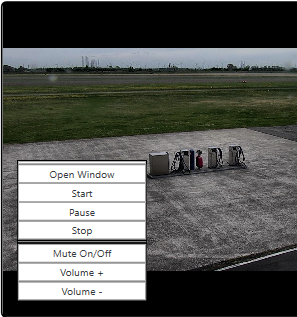
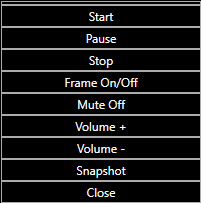
Menu in the component display Menu in the window display
Operating the display:
Designation |
Description |
|---|---|
Open menu (on the display) |
A long press on the display in the client (>750ms) displays the menu when released. Double-click to open the menu in a separate window. |
Select camera |
The cameras from the list editor are displayed in the menu. The stored stream is set up by pressing on the name. |
Open window |
Opens the current stream in a new window that is decoupled from the EisBaer client. |
Start / Pause / Stop |
Starts, stops or pauses the current playback |
Sound / Volume |
Setting for the volume. |
Frame On/Off |
Shows or hides the window frame. |
Snapshot |
Creates a photo of the displayed bid and stores it under "C:\Users\Public\Pictures" (public). |
Close |
Closes the stream window. |
Examples:
Camera |
URL URL |
|---|---|
Axis |
rtsp://<user>:<password>@<IP:Port>/axis-media/media.amp?videocodec=h264 |
Reolink |
rtsp://<User>:<Password>@<IP>:<Port>/h264Preview_01_sub |
Mobotix |
rtsp://<User>:<Password>@<IP>:<Port>/mobotix.h264 |
rtsp://<Benutzer>:<Passwort>@<IPADDRESS>:<Port>/stream/profile0 |
|
DoorBird BirdGuard B10x |
rtsp://<User>:<Password>@<IPADDRESS>/mpeg/media.amp http://<User>:<Password>@<IPADDRESS>/axis-cgi/mjpg/video.cgi |
FosCam |
http://<User>:<Password>@<IPADDRESS>/videostream.cgi |
siehe Beispiel |
Note: It may take some time to display an image.
The example paths for various IP cameras are stored on the following website: http://www.ispyconnect.com/sources.aspx